TikTok’s native rules cover the basics of campaign automation and help with quick adjustments, but they’re limited once things scale. That’s where advanced automation can give you an edge. It gives you the control to manage higher spend and keep performance steady as campaigns expand.
TikTok’s automated rules are built to simplify ad management. You can use them to create conditions that automatically adjust campaigns, ad groups, or ads based on performance. You define what triggers an action, and TikTok applies it for you. Some native rules include pausing or activating ads, adjusting budgets or modifying bids.
The drawback with TikTok rules is that they are limited to in-platform data and simple logic. Once you start managing multiple accounts, testing creative variations, or optimizing for metrics outside of TikTok, its native rules can’t keep up.
Birch covers everything native rules can do and overcomes limitations. Our system adds deeper logic, connected data, and broader control across campaigns and accounts. It turns reactive adjustments into proactive control, letting you optimize faster and with more context. Birch AI adds another layer on top: it reads your automation rules and ad account data to surface the contradictions, the blind spots, and the setups worth doubling down on. You review the suggestions and decide what to implement.
Let’s get into the main differences.
Automation depth and flexibility
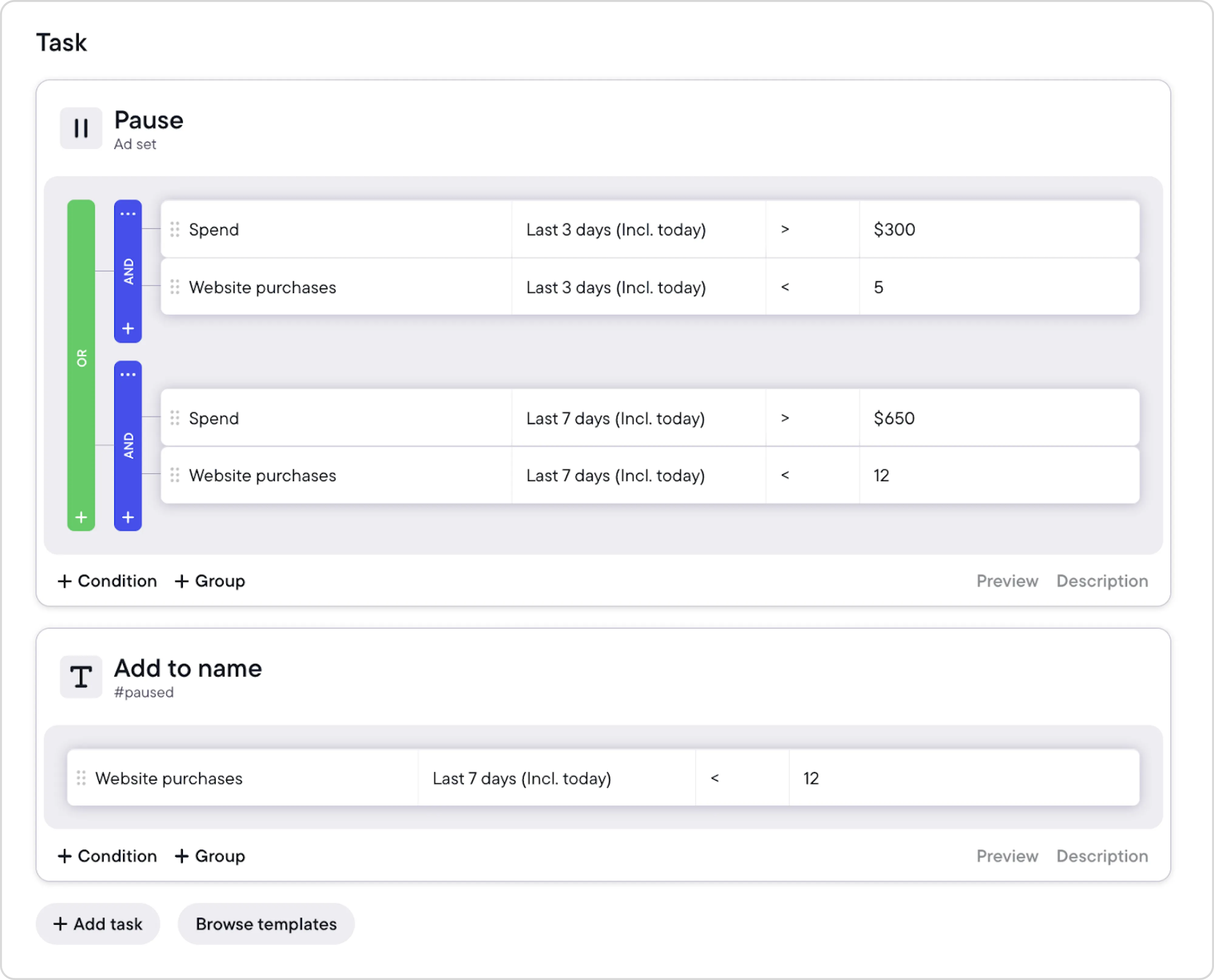
TikTok’s rules work on single triggers—but in Birch, you can build logic that mirrors real decision-making. Combine multiple conditions, group them into nested structures, and set automations to act only when the full picture matches your thresholds.
TikTok caps you at 5 conditions per rule and offers a narrow set of timeframes. Birch gives you a wider range on both fronts, so your automation can track how decisions are made instead of how the platform expects you to work.
Birch automated rules
Rules can trigger more than one action at once—for example, adjusting spend on one ad set while pausing another that overspends. Birch also lets you update asset names by adding, removing, or replacing text, which helps keep large structures consistent.
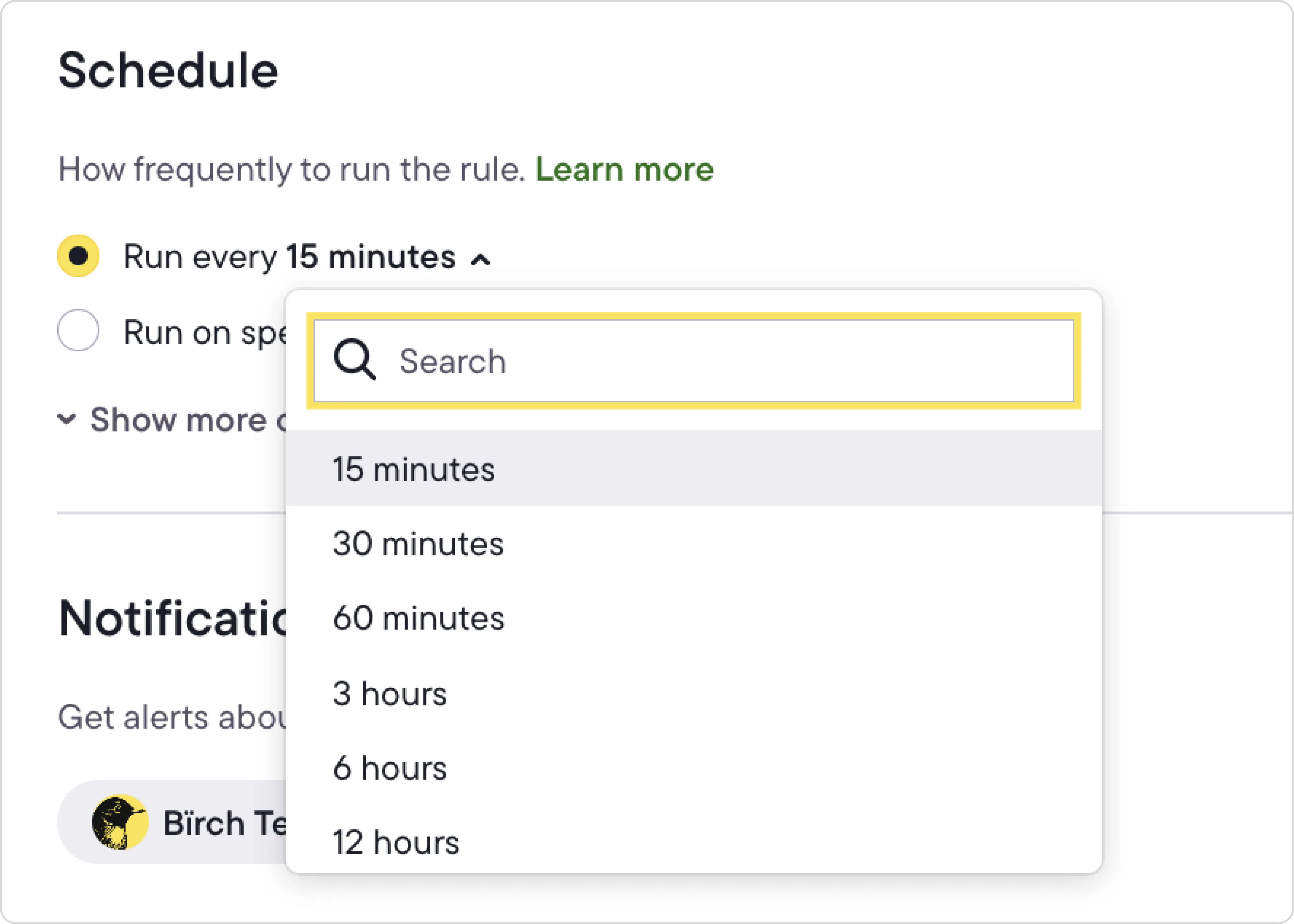
You choose how often rules run, down to every fifteen minutes.
Data access and metric control
TikTok’s automated rules rely on a limited set of in-platform metrics like spend, conversions, and ROAS, which makes it harder to track performance changes with accuracy. They work well for quick actions like pausing ads or increasing budgets. But they can’t pull from external data or combine multiple signals to show you what’s really driving performance.
Birch goes further by powering automation with a wider data layer. You get access to most metrics available through the TikTok API, and you can build custom metrics that combine TikTok performance with data from your BI tools or other tracking systems. Those metrics feed directly into your automation logic and give you a clearer view of what drives performance.
Birch also supports metric-to-metric comparisons inside a condition, which TikTok doesn’t offer. It gives your rules more nuance when you’re tracking how signals relate to each other.
With that level of context, your automation reacts to the signals that matter—like when acquisition costs outpace revenue or when TikTok conversions don’t line up with your actual sales.
Workflow efficiency and scalability
Native TikTok rules work per account, and each rule only applies to a single account. In Birch, a single rule can run across up to 5 TikTok ad accounts with the same currency. Automation stays consistent, and you don’t need to rebuild the same setup for each account. It’s a practical solution for teams managing several brands, regions, or clients.
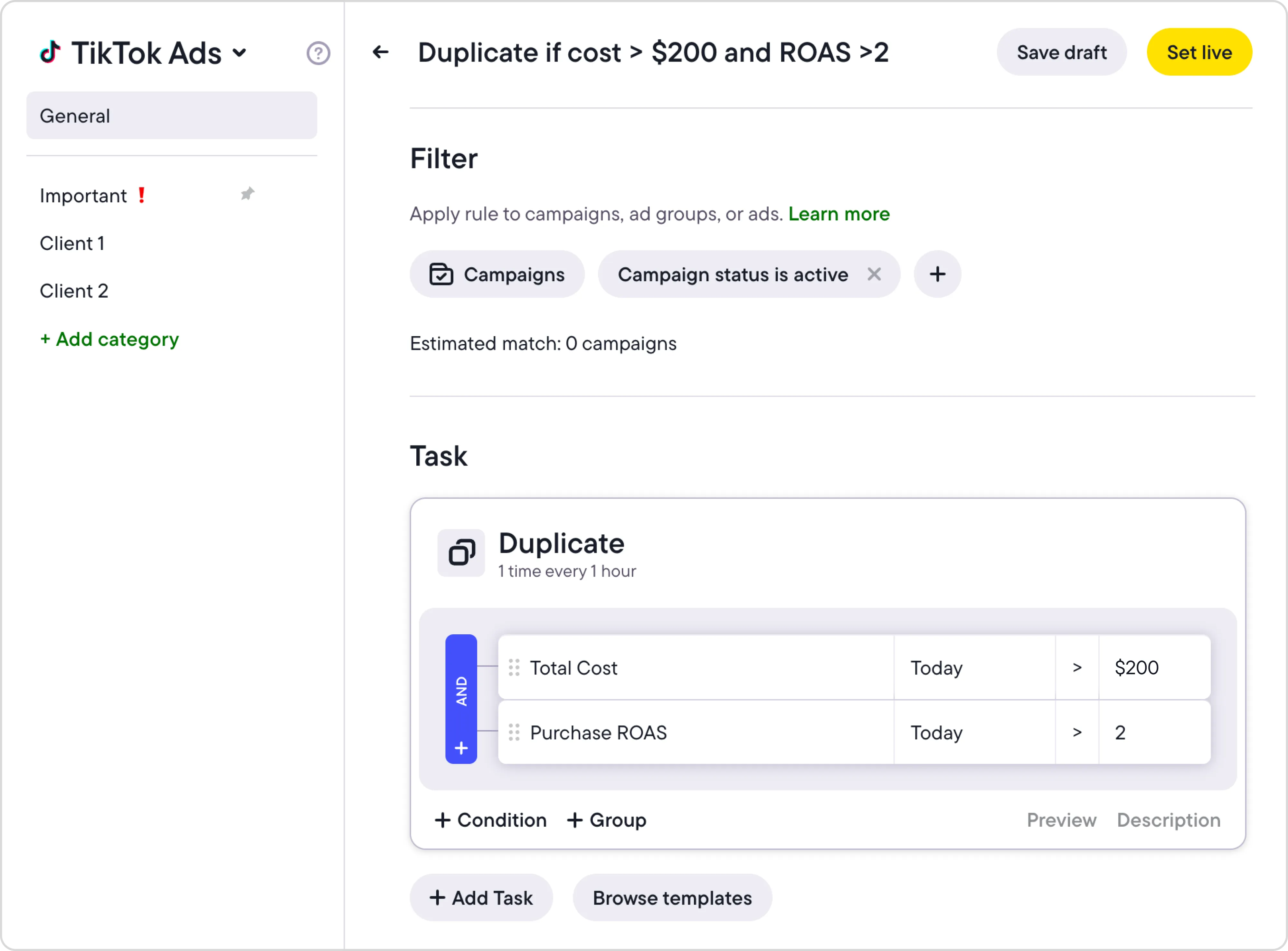
TikTok limits filtering to Active, Inactive, or Specific items. In Birch, you can filter by delivery status, name, objective, or parent structures like “ads inside active campaigns.” You can also combine multiple filters at once, which TikTok doesn’t support.
Birch automated rules
You can duplicate or edit rules in bulk and apply updates instantly. When a rule changes, the new logic applies everywhere it’s active. This structure reduces setup time and keeps campaign management organized as accounts scale.
Precision scheduling and control
TikTok’s automated rules run on fixed intervals, giving you limited control. In Birch, timing is completely within your control. For example, running rules as often as every 15 minutes might make sense for you, or you might set them to run every 72 hours. Whatever you choose, automation will match the rhythm of your campaigns.
With deeper control, you can align rules with audience patterns—scaling budgets during peak hours, resetting at midnight, pausing overnight when activity slows, or even timing restarts for the morning to catch early traffic—all without manual intervention.
Birch automated rules scheduling
Alerts, visibility, and tracking
TikTok’s automated rules can send email alerts for specific events, like when a campaign has used up most of its budget. It’s a simple way to stay informed—but it won’t give you the full picture.
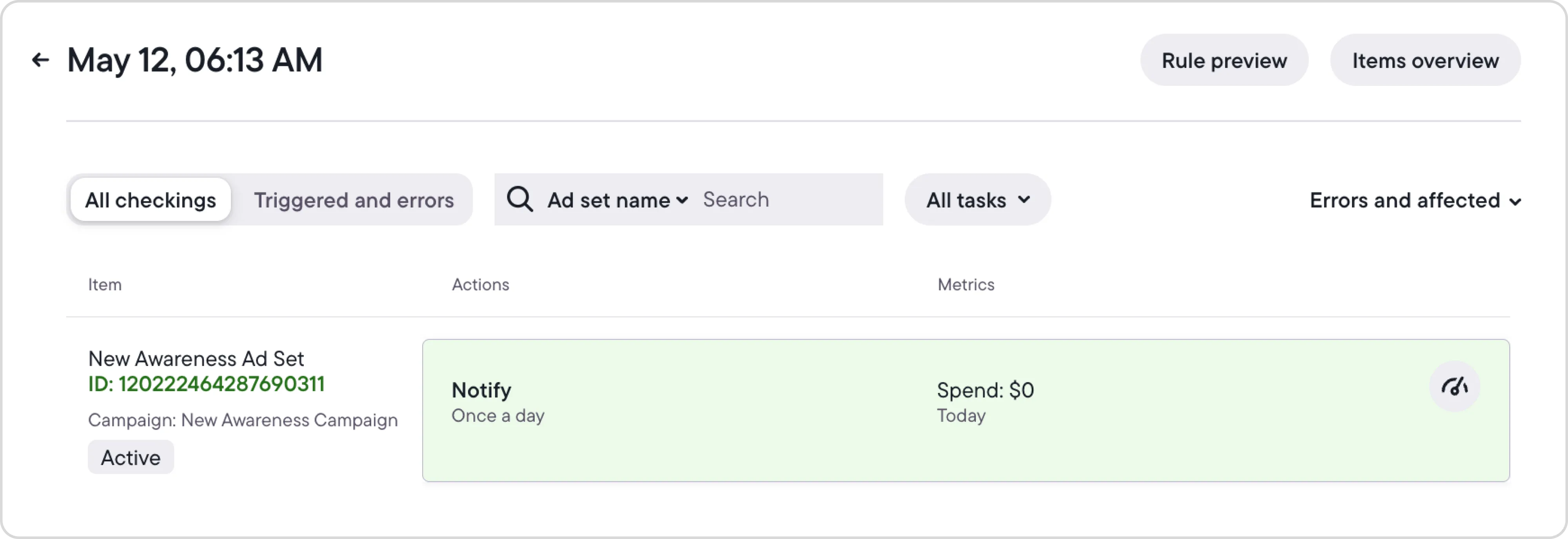
Birch gives you a complete view of what your automation is doing. You can get notifications sent to your Slack or email, keeping you in the loop. Set them to trigger only on specific conditions, and decide who receives them. Each rule also generates detailed automation logs showing when checks run, what actions were taken, and which ads were affected.
Birch notification settings
This high level of visibility helps you track changes, troubleshoot issues, and keep everyone in the team on the same page. It’s especially useful when multiple people manage the same accounts and need a clear record of what’s happening behind the automation.
Why Birch gives you more control over TikTok ad automation
TikTok’s native automated rules work well for simple setups. If you’re managing a small account, testing new campaigns, or just need basic performance safeguards, the built-in options are fast, free, and easy to use. They handle the essentials—pausing ads, adjusting budgets, and sending basic alerts.
Native rules start to fall short once you’re managing several campaigns or accounts and need automation that adapts to how you actually measure results. This is where Birch has the edge. You can use it to connect deeper data, automate across accounts, and react in real time to what drives performance.
If you’re ready to start building smarter TikTok automation, explore our ready-to-use TikTok ad strategies.
TikTok’s native rules cover the basics of campaign automation and help with quick adjustments, but they’re limited once things scale. That’s where advanced automation can give you an edge. It gives you the control to manage higher spend and keep performance steady as campaigns expand.
TikTok’s automated rules are built to simplify ad management. You can use them to create conditions that automatically adjust campaigns, ad groups, or ads based on performance. You define what triggers an action, and TikTok applies it for you. Some native rules include pausing or activating ads, adjusting budgets or modifying bids.
The drawback with TikTok rules is that they are limited to in-platform data and simple logic. Once you start managing multiple accounts, testing creative variations, or optimizing for metrics outside of TikTok, its native rules can’t keep up.
Birch covers everything native rules can do and overcomes limitations. Our system adds deeper logic, connected data, and broader control across campaigns and accounts. It turns reactive adjustments into proactive control, letting you optimize faster and with more context. Birch AI adds another layer on top: it reads your automation rules and ad account data to surface the contradictions, the blind spots, and the setups worth doubling down on. You review the suggestions and decide what to implement.
Let’s get into the main differences.
Automation depth and flexibility
TikTok’s rules work on single triggers—but in Birch, you can build logic that mirrors real decision-making. Combine multiple conditions, group them into nested structures, and set automations to act only when the full picture matches your thresholds.
TikTok caps you at 5 conditions per rule and offers a narrow set of timeframes. Birch gives you a wider range on both fronts, so your automation can track how decisions are made instead of how the platform expects you to work.
Birch automated rules
Rules can trigger more than one action at once—for example, adjusting spend on one ad set while pausing another that overspends. Birch also lets you update asset names by adding, removing, or replacing text, which helps keep large structures consistent.
You choose how often rules run, down to every fifteen minutes.
Data access and metric control
TikTok’s automated rules rely on a limited set of in-platform metrics like spend, conversions, and ROAS, which makes it harder to track performance changes with accuracy. They work well for quick actions like pausing ads or increasing budgets. But they can’t pull from external data or combine multiple signals to show you what’s really driving performance.
Birch goes further by powering automation with a wider data layer. You get access to most metrics available through the TikTok API, and you can build custom metrics that combine TikTok performance with data from your BI tools or other tracking systems. Those metrics feed directly into your automation logic and give you a clearer view of what drives performance.
Birch also supports metric-to-metric comparisons inside a condition, which TikTok doesn’t offer. It gives your rules more nuance when you’re tracking how signals relate to each other.
With that level of context, your automation reacts to the signals that matter—like when acquisition costs outpace revenue or when TikTok conversions don’t line up with your actual sales.
Workflow efficiency and scalability
Native TikTok rules work per account, and each rule only applies to a single account. In Birch, a single rule can run across up to 5 TikTok ad accounts with the same currency. Automation stays consistent, and you don’t need to rebuild the same setup for each account. It’s a practical solution for teams managing several brands, regions, or clients.
TikTok limits filtering to Active, Inactive, or Specific items. In Birch, you can filter by delivery status, name, objective, or parent structures like “ads inside active campaigns.” You can also combine multiple filters at once, which TikTok doesn’t support.
Birch automated rules
You can duplicate or edit rules in bulk and apply updates instantly. When a rule changes, the new logic applies everywhere it’s active. This structure reduces setup time and keeps campaign management organized as accounts scale.
Precision scheduling and control
TikTok’s automated rules run on fixed intervals, giving you limited control. In Birch, timing is completely within your control. For example, running rules as often as every 15 minutes might make sense for you, or you might set them to run every 72 hours. Whatever you choose, automation will match the rhythm of your campaigns.
With deeper control, you can align rules with audience patterns—scaling budgets during peak hours, resetting at midnight, pausing overnight when activity slows, or even timing restarts for the morning to catch early traffic—all without manual intervention.
Birch automated rules scheduling
Alerts, visibility, and tracking
TikTok’s automated rules can send email alerts for specific events, like when a campaign has used up most of its budget. It’s a simple way to stay informed—but it won’t give you the full picture.
Birch gives you a complete view of what your automation is doing. You can get notifications sent to your Slack or email, keeping you in the loop. Set them to trigger only on specific conditions, and decide who receives them. Each rule also generates detailed automation logs showing when checks run, what actions were taken, and which ads were affected.
Birch notification settings
This high level of visibility helps you track changes, troubleshoot issues, and keep everyone in the team on the same page. It’s especially useful when multiple people manage the same accounts and need a clear record of what’s happening behind the automation.
Why Birch gives you more control over TikTok ad automation
TikTok’s native automated rules work well for simple setups. If you’re managing a small account, testing new campaigns, or just need basic performance safeguards, the built-in options are fast, free, and easy to use. They handle the essentials—pausing ads, adjusting budgets, and sending basic alerts.
Native rules start to fall short once you’re managing several campaigns or accounts and need automation that adapts to how you actually measure results. This is where Birch has the edge. You can use it to connect deeper data, automate across accounts, and react in real time to what drives performance.
If you’re ready to start building smarter TikTok automation, explore our ready-to-use TikTok ad strategies.
What’s the main difference in Birch vs TikTok automated rules?
TikTok’s native rules cover basic automation, while Birch offers advanced logic, data integration, and cross-account control. Birch is the best TikTok automation tool for scaling campaigns.
Can Birch manage multiple TikTok ad accounts at once?
Yes. Unlike TikTok’s built-in automation, one Birch rule can manage up to 5 ad accounts with the same currency. It’s a practical choice for larger teams.
Does Birch work with data outside TikTok Ads Manager?
Absolutely. Birch can use data imported through Google Sheets, or pulled directly from your BI tools or other performance tracking systems. That gives you more control over which metrics drive your automation.
How often can Birch rules run compared to TikTok’s automation?
You control the timing. Birch rules can run as often as every 15 minutes, offering more precision and flexibility than native TikTok automated rules.
Is Birch the best TikTok automation tool for all advertisers?
For small setups, TikTok’s native rules are fine. Birch makes more sense when you’re managing several campaigns or accounts and need automation that follows your own performance logic.
What happened to Revealbot?
Revealbot has a new look and a new name—we’re now Birch! The change highlights our focus on bringing together the best of automation and creative teamwork.
Aurora Sandino
is a writer and SEO strategist focused on marketing, performance, and the digital landscape. She's a contributing writer for Birch, with a background in content strategy and client account management.