Blog

← All posts
Tracking & Attribution
March 20, 2026

Conversions API vs Meta Pixel vs Signals Gateway vs Bïrch Hub: Which tracking setup is right for you?

by
Ana Siu

If you’re comparing the conversions API vs. Meta Pixel, you’re probably trying to understand why your tracking feels less stable than it used to.

Your reported conversions might not align with your backend numbers. Match quality may have declined. Privacy updates or ad blockers could be affecting attribution. Or, the setup may simply feel less reliable than it did before, now that you’re scaling.

Installing the Meta Pixel used to be enough—but today, most teams move beyond browser-only tracking and consider server-side setups with the Meta Conversions API. Sometimes, they deploy CAPI via a gateway solution or maintain it via an orchestration layer like Bïrch Hub.

These are architectural choices, each bringing trade-offs in reliability, control, and ongoing maintenance needs. This guide breaks down how they compare and what to consider for your setup.

Before going deeper into each option, it helps to see them side by side. You won’t just see differences in terms of browser-based vs. server-side tracking. Ownership and maintenance requirements are also different, and you’ll need to consider how much complexity your team is prepared to manage.

Quick comparison: tracking approaches at a glance

Setup Browser-based Server-side Infrastructure ownership Setup effort Ongoing maintenance Typical fit
Meta Pixel Yes No None Low Low Smaller advertisers
Meta Conversions API Optional Yes Full Medium–high Medium–high Scaling brands
Conversions API Gateway Yes Yes Partial Medium Medium Brands with technical support
Signals Gateway Yes Yes + routing Full High High Enterprise teams
Birch Hub Yes Yes + managed layer Managed Medium Lower Agencies & performance teams

Setup: Meta Pixel

Browser-based: Yes

Server-side: No

Infrastructure ownership: None

Setup effort: Low

Ongoing maintenance: Low

Typical fit: Smaller advertisers

Setup: Meta Conversions API

Browser-based: Optional

Server-side: Yes

Infrastructure ownership: Full

Setup effort: Medium–high

Ongoing maintenance: Medium–high

Typical fit: Scaling brands

Setup: Conversions API Gateway

Browser-based: Yes

Server-side: Yes

Infrastructure ownership: Partial

Setup effort: Medium

Ongoing maintenance: Medium

Typical fit: Brands with technical support

Setup: Signals Gateway

Browser-based: Yes

Server-side: Yes + routing

Infrastructure ownership: Full

Setup effort: High

Ongoing maintenance: High

Typical fit: Enterprise teams

Setup: Birch Hub

Browser-based: Yes

Server-side: Yes + managed layer

Infrastructure ownership: Managed

Setup effort: Medium

Ongoing maintenance: Lower

Typical fit: Agencies & performance teams

Key takeaways

  • The Meta Pixel is easy to implement, but browser-based tracking is increasingly affected by privacy restrictions and signal loss.
  • The Meta Conversions API improves reliability through server-side tracking, but it requires development resources and ongoing maintenance.
  • Deploying CAPI through the Conversions API Gateway reduces setup complexity, but infrastructure ownership and monitoring are still needed.
  • Signals Gateway provides centralized routing and governance, well-suited for enterprise teams with internal data resources.
  • Bïrch Hub provides a managed server-side tracking and orchestration layer for teams looking to improve reliability without maintaining their own infrastructure.
  • The real decision isn’t just Pixel vs CAPI—it’s how much tracking infrastructure your team is prepared to manage over time.

What is the Meta Pixel?

The Meta Pixel is still the starting point for most marketers.

It’s a browser-based script that fires events when a user loads a page or completes an action on your site. Those events are sent directly from the user’s browser to Meta.

The Meta Pixel’s strength is simplicity. It’s quick to implement, easy to validate in Events Manager, and doesn’t require server infrastructure. If your site is stable and your spend is moderate, it can perform reliably.

The main limitation is that it relies entirely on the browser.

Because it runs in the browser, the Pixel is exposed to ad blockers, tracking prevention mechanisms, consent restrictions, and connection instability. If reported purchases fluctuate or match quality shifts unexpectedly, browser-level signal loss is often part of the explanation.

What is the Meta Conversions API?

​​The Meta Conversions API moves tracking from the browser to your server.

Instead of relying on the Meta Pixel alone to send events from a user’s browser, CAPI sends events directly from your backend to Meta. When someone completes a purchase or submits a form, your server shares the event via an API.
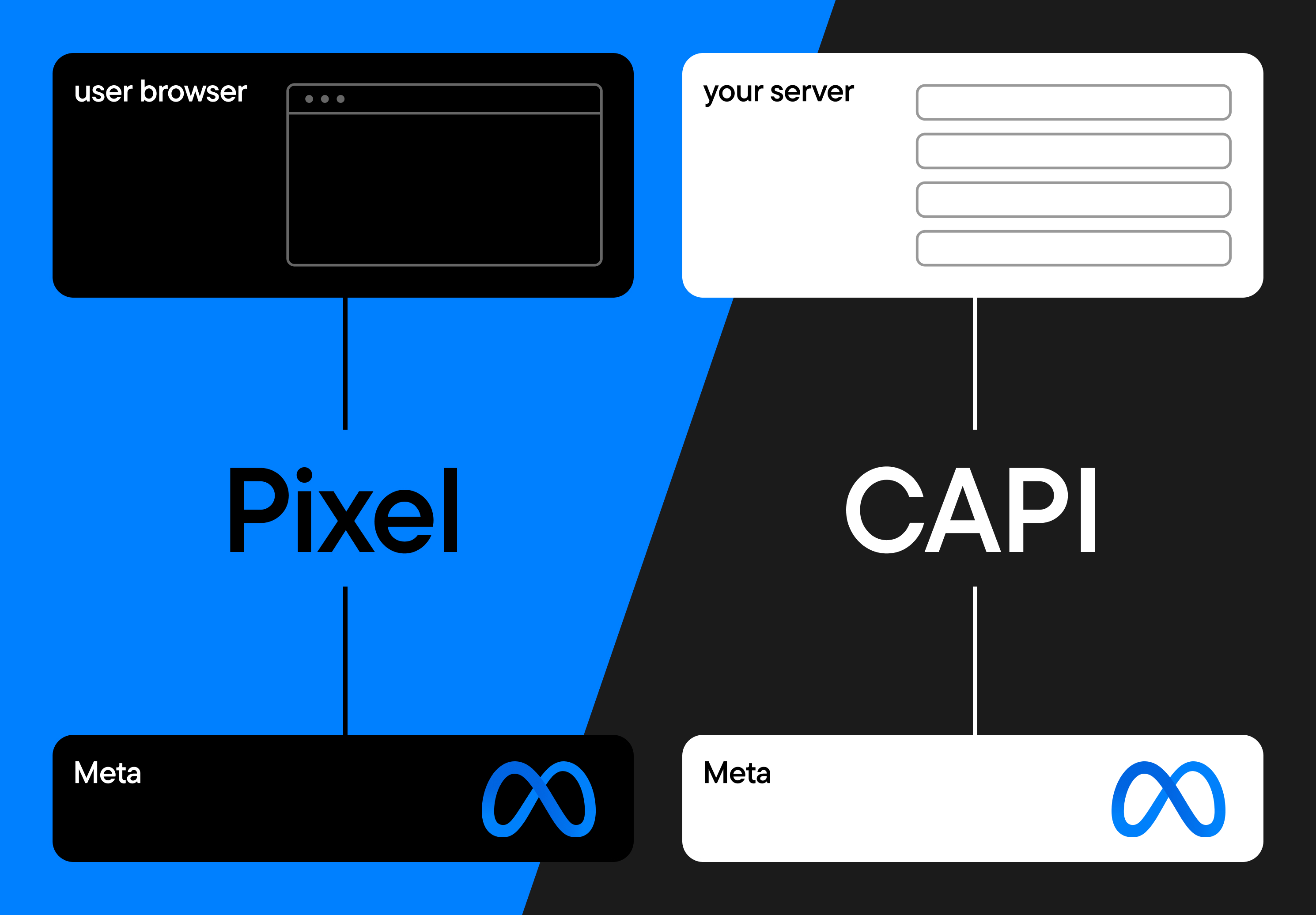
Reliability is one of the main benefits. Because events are delivered server-to-server, ad blockers, browser restrictions, and unstable client-side connections have less of an effect.

Many teams see more consistent reporting and improved event match quality after implementing CAPI.

At the same time, server-side tracking introduces more structure. You define the event payload and manage how data is formatted before it’s sent. That flexibility can support a stronger first-party tracking strategy—but it also requires ownership.

CAPI typically gets deployed in one of two ways:

  • A custom server-to-server integration built and maintained by your development team
  • A managed deployment using Meta Conversions API Gateway, which reduces custom coding but still requires cloud configuration, monitoring, and ongoing maintenance

In both cases, CAPI isn’t “set and forget.” If you, like most teams, run it alongside the Meta Pixel, you need to configure event deduplication correctly. Site changes, checkout updates, or consent adjustments can require updates to your implementation.

It’s also important to clarify what CAPI doesn’t do. It doesn’t automate your tracking operations, nor does it give you full data control. 

Even though events originate from your server, they must follow Meta’s schema and measurement framework. Attribution and optimization remain inside Meta’s ecosystem.

CAPI strengthens signal delivery. How manageable it feels depends on how you deploy it—and how much infrastructure your team is prepared to maintain.

What is Meta Signals Gateway?

The Meta Signals Gateway builds on server-side tracking. It adds a centralized layer that lets you manage how first-party data flows to Meta.
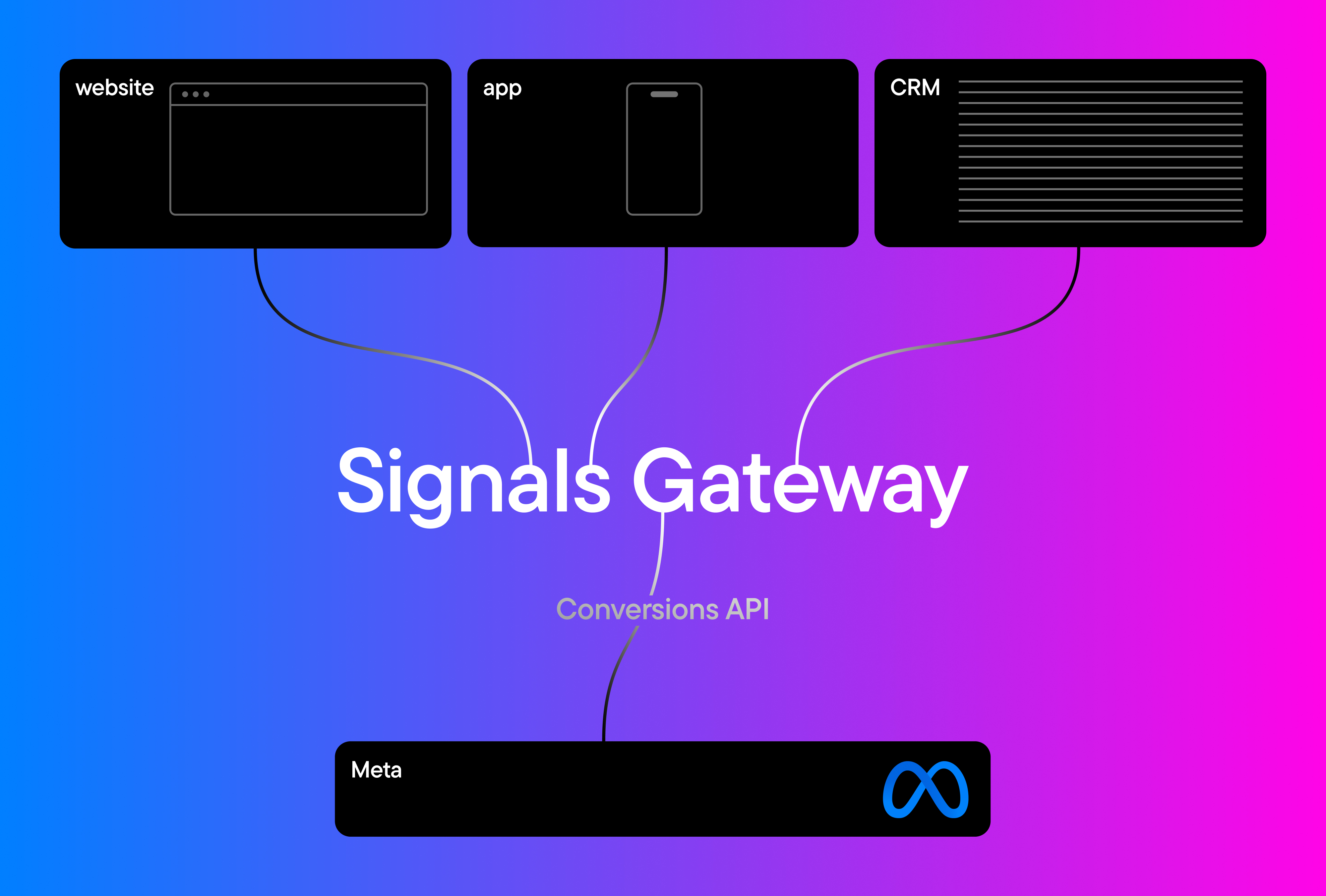
Diagram showing website, and CRM sending data into a centralized Signals Gateway layer, which then forwards events to Meta via the Conversions API.

If the Meta Conversions API is about sending events from your server, Signals Gateway is about organizing and governing those events before they are sent. It allows teams to standardize payloads, validate incoming data, and apply logic at a centralized infrastructure level.

This makes it particularly relevant for organizations working with multiple data sources. Data from websites, apps, CRMs, or offline systems needs to be aligned before activation. Signals Gateway can support first-party data enrichment by structuring and preparing event data within a controlled server environment.

Meta Signals Gateway is typically adopted by enterprise teams with internal data engineering resources. Deployment involves cloud configuration, infrastructure management, and ongoing monitoring. It becomes part of your broader data architecture.

There’s also a natural overlap with the Conversions API. Signals Gateway doesn’t replace CAPI. It operates through it. CAPI handles server-side event transmission, while Signals Gateway centralizes the validation and routing of those events beforehand.

This added control can benefit organizations that need governance and flexibility at scale. For smaller teams, the increased architectural responsibility may outweigh the benefits.

Where traditional tracking setups become complex

Browser-based tracking has become more fragile. Server-side tracking improves reliability—but once you introduce CAPI, tracking becomes a maintained system rather than a single script.
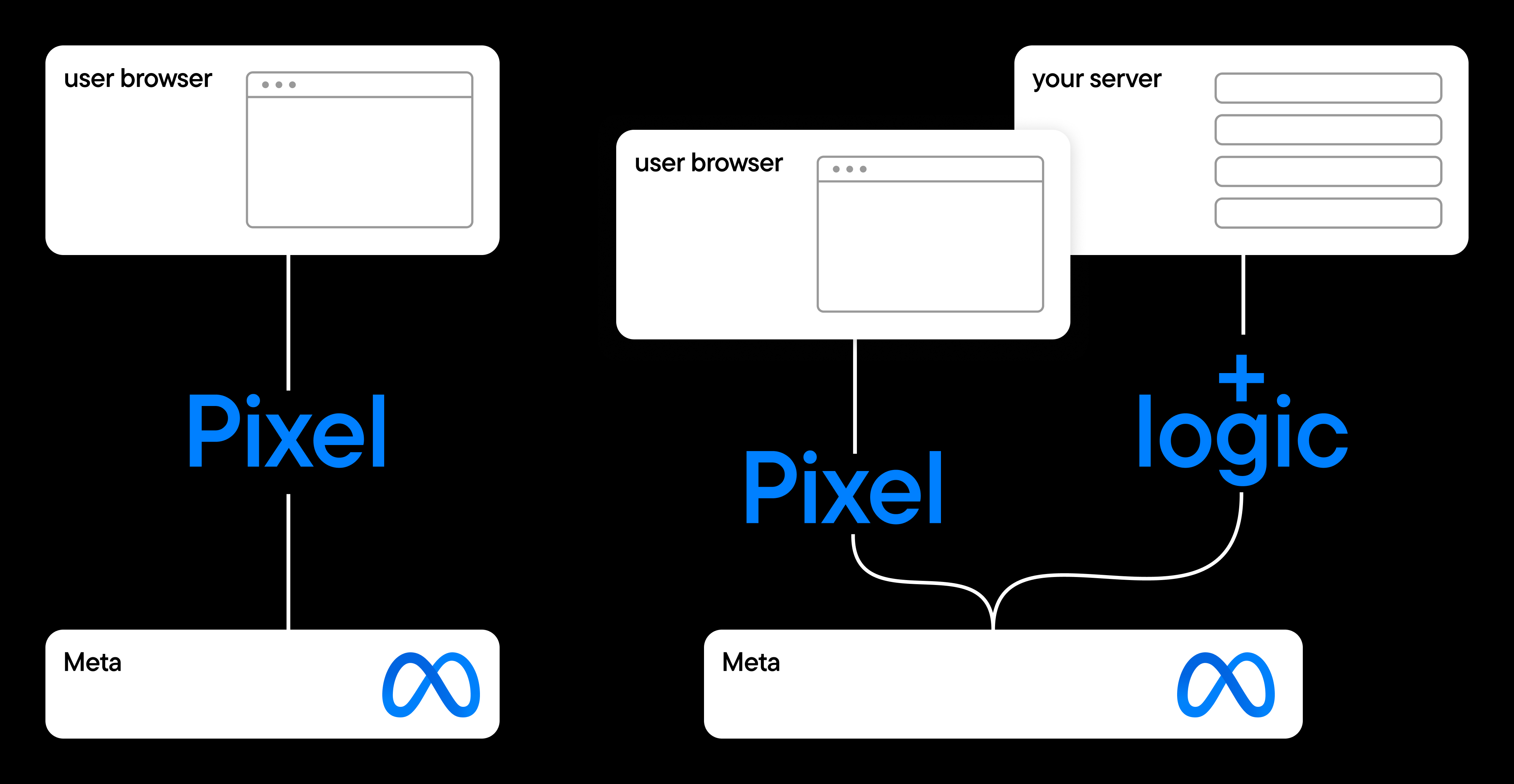
Meta Pixel vs hybrid setup

Hybrid setups require tight alignment between browser and server events. Event names must match across both layers, deduplication needs to be configured correctly, and payload parameters must remain consistent with Meta’s schema. Even small inconsistencies in naming or structure can create reporting gaps that compound over time.

As sites change, with new checkout flows, consent updates, or additional domains, you often need to adjust tracking logic. Scaling adds more moving parts: multiple ad accounts, storefronts, or configurations to maintain.

At that point, the question shifts from “Pixel vs CAPI” to something more operational: who maintains the system over time?

From there, the path usually goes in one of two directions:

  • Expand internal ownership of the tracking layer, or
  • Adopt a centralized solution that keeps it structured and manageable.

What is Bïrch Hub?

Bïrch Hub is a managed first-party server-side tracking and event orchestration layer built on top of Meta’s infrastructure.

The Hub works with the Meta Pixel or the Meta Conversions API. It aims to centralize how browser and server-side tracking are implemented, maintained, and monitored across accounts.
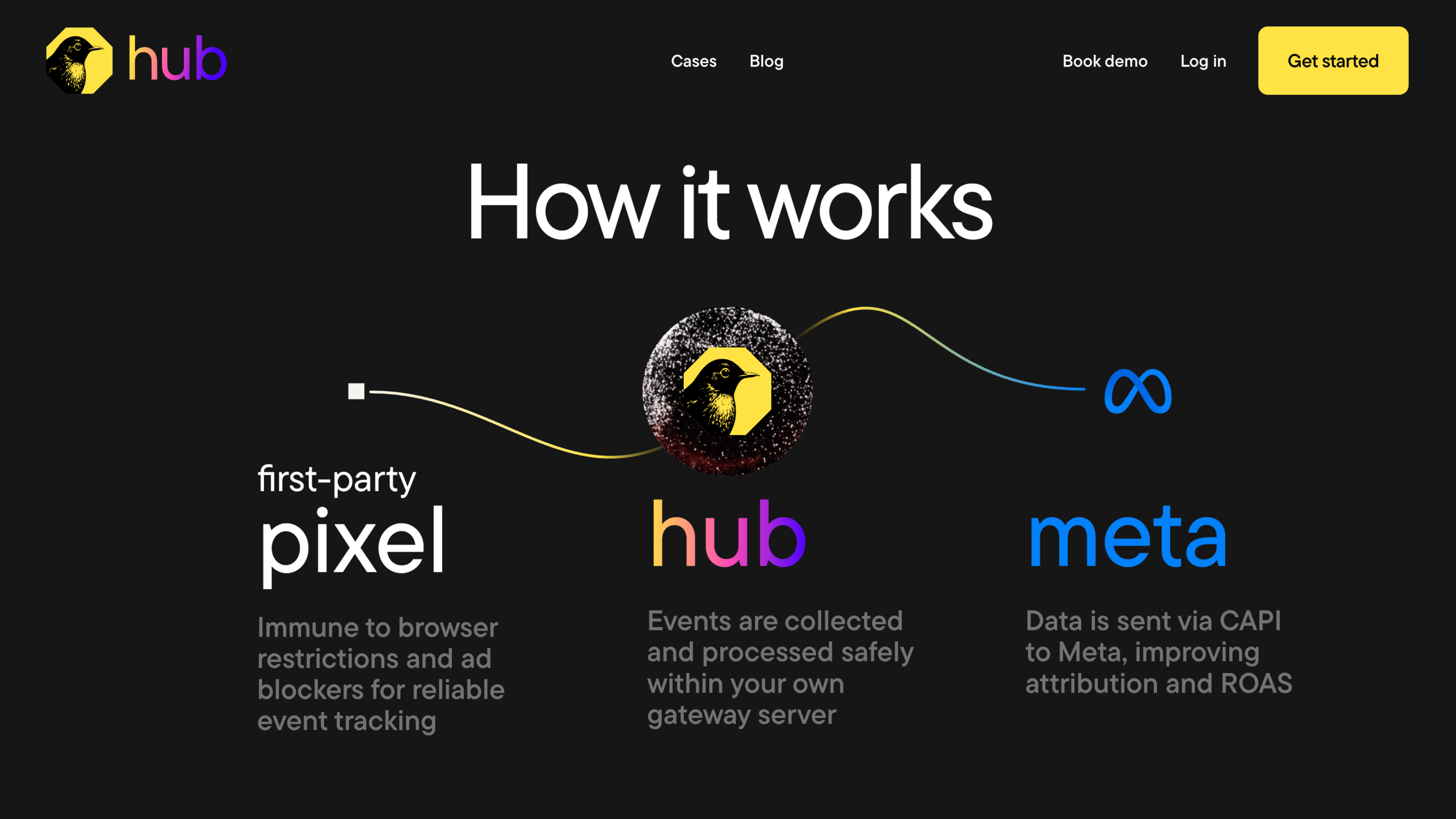
Bïrch Hub connects your data source to Meta. It centralizes event configuration and helps maintain consistent deduplication and alignment between browser and server-side events as your site or account structure evolves. Instead of configuring each ad account or domain separately, teams manage tracking through a unified layer.

This becomes especially relevant in hybrid setups. Running both the Pixel and Conversions API requires precision. Event IDs must match, and parameters must remain synchronized. 

When configurations drift across accounts, reporting inconsistencies tend to follow. An orchestration layer reduces that drift by applying structure centrally rather than account-by-account.

Discover Bïrch Hub, a hassle-free setup with user-friendly interface

It also addresses operational overhead. Server-side tracking often starts as a reliability upgrade and gradually turns into a maintenance task—reviewing diagnostics, monitoring match quality, and updating configurations after site changes. 

By centralizing that infrastructure layer, Bïrch Hub can reduce repetitive configuration work across environments.

The emphasis is on maintaining signal quality while limiting operational complexity. That’s especially helpful for agencies and performance teams managing multiple brands or ad accounts.

Direct comparison: the differences between tracking setups

The table at the top of this article focused on structure—but this comparison goes deeper into operational differences. It shows how each setup handles hosting, maintenance, and long-term ownership.

Feature Meta Pixel Conversions API Gateway (CAPIG) Meta Signals Gateway Birch Hub
Purpose Browser-based tracking that sends events from the user’s browser to Meta Managed deployment of server-side Conversions API Centralized server-side data routing and governance Managed server-side tracking and orchestration layer
How events are sent From browser to Meta From server via managed gateway From centralized infrastructure via CAPI From the managed first-party server-side layer
Hosting No hosting required Customer-hosted cloud environment Self- or partner-hosted infrastructure Infrastructure managed by Birch
Data sources Browser events only Browser + backend events Multiple first-party sources (web, app, CRM, backend) Hybrid browser + server-side events
Destinations Meta Ads Meta Conversions API Meta Conversions API (plus configurable endpoints) Meta Conversions API
Reliability Vulnerable to browser restrictions More consistent than browser-only High consistency with centralized validation Stable hybrid consistency across accounts
Compliance flexibility Limited to browser consent handling Structured server-side consent handling Advanced infrastructure-level governance Structured server-side handling within the Meta ecosystem
Maintenance required Minimal Cloud monitoring required Ongoing infrastructure management Infrastructure managed within the orchestration layer
Best suited for Single-site advertisers Brands with technical resources Enterprise organizations Agencies and multi-account teams
Primary limitation Browser dependency Requires infrastructure ownership Higher architectural complexity Focused on tracking orchestration; not a general analytics or data storage platform

Feature: Purpose

Meta Pixel: Browser-based tracking that sends events from the user’s browser to Meta

CAPIG: Managed deployment of server-side Conversions API

Signals Gateway: Centralized server-side data routing and governance

Birch Hub: Managed server-side tracking and orchestration layer

Feature: How events are sent

Meta Pixel: From browser to Meta

CAPIG: From server via managed gateway

Signals Gateway: From centralized infrastructure via CAPI

Birch Hub: From the managed first-party server-side layer

Feature: Hosting

Meta Pixel: No hosting required

CAPIG: Customer-hosted cloud environment

Signals Gateway: Self- or partner-hosted infrastructure

Birch Hub: Infrastructure managed by Birch

Feature: Data sources

Meta Pixel: Browser events only

CAPIG: Browser + backend events

Signals Gateway: Multiple first-party sources (web, app, CRM, backend)

Birch Hub: Hybrid browser + server-side events

Feature: Destinations

Meta Pixel: Meta Ads

CAPIG: Meta Conversions API

Signals Gateway: Meta Conversions API (plus configurable endpoints)

Birch Hub: Meta Conversions API

Feature: Reliability

Meta Pixel: Vulnerable to browser restrictions

CAPIG: More consistent than browser-only

Signals Gateway: High consistency with centralized validation

Birch Hub: Stable hybrid consistency across accounts

Feature: Compliance flexibility

Meta Pixel: Limited to browser consent handling

CAPIG: Structured server-side consent handling

Signals Gateway: Advanced infrastructure-level governance

Birch Hub: Structured server-side handling within the Meta ecosystem

Feature: Maintenance required

Meta Pixel: Minimal

CAPIG: Cloud monitoring required

Signals Gateway: Ongoing infrastructure management

Birch Hub: Infrastructure managed within the orchestration layer

Feature: Best suited for

Meta Pixel: Single-site advertisers

CAPIG: Brands with technical resources

Signals Gateway: Enterprise organizations

Birch Hub: Agencies and multi-account teams

Feature: Primary limitation

Meta Pixel: Browser dependency

CAPIG: Requires infrastructure ownership

Signals Gateway: Higher architectural complexity

Birch Hub: Focused on tracking orchestration; not a general analytics platform

Which setup is right for you?

There is no universal “best” tracking setup. The right choice depends on how your business operates, where conversions happen, and how much infrastructure your team is prepared to maintain over time.

For a single ecommerce storefront with moderate spend, the Meta Pixel may still support campaign optimization. Adding CAPI often improves stability when reporting gaps or match quality fluctuations start affecting decisions. Again, that’s where maintenance becomes a consideration.

As DTC brands scale, signal reliability becomes more critical. Most teams adopt a hybrid setup that combines the Pixel with CAPI. From there, the decision shifts toward structure. Some teams build and manage CAPI internally. Others prefer to centralize the setup to reduce long-term operational load, especially across multiple domains or markets.

Agencies face a different challenge: consistency.

Maintaining event alignment, deduplication logic, and diagnostics across multiple client accounts can become time-consuming. In those cases, centralizing tracking management can reduce configuration drift and ongoing troubleshooting.

Governance becomes central for multi-brand or enterprise organizations. Managing tracking across regions, domains, and compliance frameworks requires a more structured infrastructure. Greater flexibility can offer control, but it also increases architectural responsibility.

Here’s a simple way to frame the decision:

  • If browser signal loss is your main issue, server-side tracking is usually the first step.
  • If operational complexity is the bigger constraint, centralization becomes more relevant.
  • If your team is comfortable owning infrastructure, native Meta solutions may be sufficient.
  • If maintaining tracking across environments is slowing down performance work, a managed layer can reduce that overhead.

From data collection to system design

Tracking today is about building a reliable system. Signal quality supports stable reporting and bidding. Centralization keeps events aligned across accounts. Activation ensures the data you collect actually informs performance decisions. 

As complexity grows, consistency becomes the advantage. What matters most is whether the structure behind your tracking can scale with it.

For some teams, native Meta tools are enough. For others, especially agencies or multi-account environments, centralizing server-side tracking becomes part of maintaining performance.

Bïrch Hub was built around that idea: helping teams centralize server-side tracking so signal quality improves without turning infrastructure into a separate project. 
Explore Bïrch with a 14-day free trial

FAQs

If you’re comparing the conversions API vs. Meta Pixel, you’re probably trying to understand why your tracking feels less stable than it used to.

Your reported conversions might not align with your backend numbers. Match quality may have declined. Privacy updates or ad blockers could be affecting attribution. Or, the setup may simply feel less reliable than it did before, now that you’re scaling.

Installing the Meta Pixel used to be enough—but today, most teams move beyond browser-only tracking and consider server-side setups with the Meta Conversions API. Sometimes, they deploy CAPI via a gateway solution or maintain it via an orchestration layer like Bïrch Hub.

These are architectural choices, each bringing trade-offs in reliability, control, and ongoing maintenance needs. This guide breaks down how they compare and what to consider for your setup.

Before going deeper into each option, it helps to see them side by side. You won’t just see differences in terms of browser-based vs. server-side tracking. Ownership and maintenance requirements are also different, and you’ll need to consider how much complexity your team is prepared to manage.

Quick comparison: tracking approaches at a glance

Setup Browser-based Server-side Infrastructure ownership Setup effort Ongoing maintenance Typical fit
Meta Pixel Yes No None Low Low Smaller advertisers
Meta Conversions API Optional Yes Full Medium–high Medium–high Scaling brands
Conversions API Gateway Yes Yes Partial Medium Medium Brands with technical support
Signals Gateway Yes Yes + routing Full High High Enterprise teams
Birch Hub Yes Yes + managed layer Managed Medium Lower Agencies & performance teams

Setup: Meta Pixel

Browser-based: Yes

Server-side: No

Infrastructure ownership: None

Setup effort: Low

Ongoing maintenance: Low

Typical fit: Smaller advertisers

Setup: Meta Conversions API

Browser-based: Optional

Server-side: Yes

Infrastructure ownership: Full

Setup effort: Medium–high

Ongoing maintenance: Medium–high

Typical fit: Scaling brands

Setup: Conversions API Gateway

Browser-based: Yes

Server-side: Yes

Infrastructure ownership: Partial

Setup effort: Medium

Ongoing maintenance: Medium

Typical fit: Brands with technical support

Setup: Signals Gateway

Browser-based: Yes

Server-side: Yes + routing

Infrastructure ownership: Full

Setup effort: High

Ongoing maintenance: High

Typical fit: Enterprise teams

Setup: Birch Hub

Browser-based: Yes

Server-side: Yes + managed layer

Infrastructure ownership: Managed

Setup effort: Medium

Ongoing maintenance: Lower

Typical fit: Agencies & performance teams

Key takeaways

  • The Meta Pixel is easy to implement, but browser-based tracking is increasingly affected by privacy restrictions and signal loss.
  • The Meta Conversions API improves reliability through server-side tracking, but it requires development resources and ongoing maintenance.
  • Deploying CAPI through the Conversions API Gateway reduces setup complexity, but infrastructure ownership and monitoring are still needed.
  • Signals Gateway provides centralized routing and governance, well-suited for enterprise teams with internal data resources.
  • Bïrch Hub provides a managed server-side tracking and orchestration layer for teams looking to improve reliability without maintaining their own infrastructure.
  • The real decision isn’t just Pixel vs CAPI—it’s how much tracking infrastructure your team is prepared to manage over time.

What is the Meta Pixel?

The Meta Pixel is still the starting point for most marketers.

It’s a browser-based script that fires events when a user loads a page or completes an action on your site. Those events are sent directly from the user’s browser to Meta.

The Meta Pixel’s strength is simplicity. It’s quick to implement, easy to validate in Events Manager, and doesn’t require server infrastructure. If your site is stable and your spend is moderate, it can perform reliably.

The main limitation is that it relies entirely on the browser.

Because it runs in the browser, the Pixel is exposed to ad blockers, tracking prevention mechanisms, consent restrictions, and connection instability. If reported purchases fluctuate or match quality shifts unexpectedly, browser-level signal loss is often part of the explanation.

What is the Meta Conversions API?

​​The Meta Conversions API moves tracking from the browser to your server.

Instead of relying on the Meta Pixel alone to send events from a user’s browser, CAPI sends events directly from your backend to Meta. When someone completes a purchase or submits a form, your server shares the event via an API.

Reliability is one of the main benefits. Because events are delivered server-to-server, ad blockers, browser restrictions, and unstable client-side connections have less of an effect.

Many teams see more consistent reporting and improved event match quality after implementing CAPI.

At the same time, server-side tracking introduces more structure. You define the event payload and manage how data is formatted before it’s sent. That flexibility can support a stronger first-party tracking strategy—but it also requires ownership.

CAPI typically gets deployed in one of two ways:

  • A custom server-to-server integration built and maintained by your development team
  • A managed deployment using Meta Conversions API Gateway, which reduces custom coding but still requires cloud configuration, monitoring, and ongoing maintenance

In both cases, CAPI isn’t “set and forget.” If you, like most teams, run it alongside the Meta Pixel, you need to configure event deduplication correctly. Site changes, checkout updates, or consent adjustments can require updates to your implementation.

It’s also important to clarify what CAPI doesn’t do. It doesn’t automate your tracking operations, nor does it give you full data control. 

Even though events originate from your server, they must follow Meta’s schema and measurement framework. Attribution and optimization remain inside Meta’s ecosystem.

CAPI strengthens signal delivery. How manageable it feels depends on how you deploy it—and how much infrastructure your team is prepared to maintain.

What is Meta Signals Gateway?

The Meta Signals Gateway builds on server-side tracking. It adds a centralized layer that lets you manage how first-party data flows to Meta.

Diagram showing website, and CRM sending data into a centralized Signals Gateway layer, which then forwards events to Meta via the Conversions API.

If the Meta Conversions API is about sending events from your server, Signals Gateway is about organizing and governing those events before they are sent. It allows teams to standardize payloads, validate incoming data, and apply logic at a centralized infrastructure level.

This makes it particularly relevant for organizations working with multiple data sources. Data from websites, apps, CRMs, or offline systems needs to be aligned before activation. Signals Gateway can support first-party data enrichment by structuring and preparing event data within a controlled server environment.

Meta Signals Gateway is typically adopted by enterprise teams with internal data engineering resources. Deployment involves cloud configuration, infrastructure management, and ongoing monitoring. It becomes part of your broader data architecture.

There’s also a natural overlap with the Conversions API. Signals Gateway doesn’t replace CAPI. It operates through it. CAPI handles server-side event transmission, while Signals Gateway centralizes the validation and routing of those events beforehand.

This added control can benefit organizations that need governance and flexibility at scale. For smaller teams, the increased architectural responsibility may outweigh the benefits.

Where traditional tracking setups become complex

Browser-based tracking has become more fragile. Server-side tracking improves reliability—but once you introduce CAPI, tracking becomes a maintained system rather than a single script.

Meta Pixel vs hybrid setup

Hybrid setups require tight alignment between browser and server events. Event names must match across both layers, deduplication needs to be configured correctly, and payload parameters must remain consistent with Meta’s schema. Even small inconsistencies in naming or structure can create reporting gaps that compound over time.

As sites change, with new checkout flows, consent updates, or additional domains, you often need to adjust tracking logic. Scaling adds more moving parts: multiple ad accounts, storefronts, or configurations to maintain.

At that point, the question shifts from “Pixel vs CAPI” to something more operational: who maintains the system over time?

From there, the path usually goes in one of two directions:

  • Expand internal ownership of the tracking layer, or
  • Adopt a centralized solution that keeps it structured and manageable.

What is Bïrch Hub?

Bïrch Hub is a managed first-party server-side tracking and event orchestration layer built on top of Meta’s infrastructure.

The Hub works with the Meta Pixel or the Meta Conversions API. It aims to centralize how browser and server-side tracking are implemented, maintained, and monitored across accounts.

Bïrch Hub connects your data source to Meta. It centralizes event configuration and helps maintain consistent deduplication and alignment between browser and server-side events as your site or account structure evolves. Instead of configuring each ad account or domain separately, teams manage tracking through a unified layer.

This becomes especially relevant in hybrid setups. Running both the Pixel and Conversions API requires precision. Event IDs must match, and parameters must remain synchronized. 

When configurations drift across accounts, reporting inconsistencies tend to follow. An orchestration layer reduces that drift by applying structure centrally rather than account-by-account.

Discover Bïrch Hub, a hassle-free setup with user-friendly interface

It also addresses operational overhead. Server-side tracking often starts as a reliability upgrade and gradually turns into a maintenance task—reviewing diagnostics, monitoring match quality, and updating configurations after site changes. 

By centralizing that infrastructure layer, Bïrch Hub can reduce repetitive configuration work across environments.

The emphasis is on maintaining signal quality while limiting operational complexity. That’s especially helpful for agencies and performance teams managing multiple brands or ad accounts.

Direct comparison: the differences between tracking setups

The table at the top of this article focused on structure—but this comparison goes deeper into operational differences. It shows how each setup handles hosting, maintenance, and long-term ownership.

Feature Meta Pixel Conversions API Gateway (CAPIG) Meta Signals Gateway Birch Hub
Purpose Browser-based tracking that sends events from the user’s browser to Meta Managed deployment of server-side Conversions API Centralized server-side data routing and governance Managed server-side tracking and orchestration layer
How events are sent From browser to Meta From server via managed gateway From centralized infrastructure via CAPI From the managed first-party server-side layer
Hosting No hosting required Customer-hosted cloud environment Self- or partner-hosted infrastructure Infrastructure managed by Birch
Data sources Browser events only Browser + backend events Multiple first-party sources (web, app, CRM, backend) Hybrid browser + server-side events
Destinations Meta Ads Meta Conversions API Meta Conversions API (plus configurable endpoints) Meta Conversions API
Reliability Vulnerable to browser restrictions More consistent than browser-only High consistency with centralized validation Stable hybrid consistency across accounts
Compliance flexibility Limited to browser consent handling Structured server-side consent handling Advanced infrastructure-level governance Structured server-side handling within the Meta ecosystem
Maintenance required Minimal Cloud monitoring required Ongoing infrastructure management Infrastructure managed within the orchestration layer
Best suited for Single-site advertisers Brands with technical resources Enterprise organizations Agencies and multi-account teams
Primary limitation Browser dependency Requires infrastructure ownership Higher architectural complexity Focused on tracking orchestration; not a general analytics or data storage platform

Feature: Purpose

Meta Pixel: Browser-based tracking that sends events from the user’s browser to Meta

CAPIG: Managed deployment of server-side Conversions API

Signals Gateway: Centralized server-side data routing and governance

Birch Hub: Managed server-side tracking and orchestration layer

Feature: How events are sent

Meta Pixel: From browser to Meta

CAPIG: From server via managed gateway

Signals Gateway: From centralized infrastructure via CAPI

Birch Hub: From the managed first-party server-side layer

Feature: Hosting

Meta Pixel: No hosting required

CAPIG: Customer-hosted cloud environment

Signals Gateway: Self- or partner-hosted infrastructure

Birch Hub: Infrastructure managed by Birch

Feature: Data sources

Meta Pixel: Browser events only

CAPIG: Browser + backend events

Signals Gateway: Multiple first-party sources (web, app, CRM, backend)

Birch Hub: Hybrid browser + server-side events

Feature: Destinations

Meta Pixel: Meta Ads

CAPIG: Meta Conversions API

Signals Gateway: Meta Conversions API (plus configurable endpoints)

Birch Hub: Meta Conversions API

Feature: Reliability

Meta Pixel: Vulnerable to browser restrictions

CAPIG: More consistent than browser-only

Signals Gateway: High consistency with centralized validation

Birch Hub: Stable hybrid consistency across accounts

Feature: Compliance flexibility

Meta Pixel: Limited to browser consent handling

CAPIG: Structured server-side consent handling

Signals Gateway: Advanced infrastructure-level governance

Birch Hub: Structured server-side handling within the Meta ecosystem

Feature: Maintenance required

Meta Pixel: Minimal

CAPIG: Cloud monitoring required

Signals Gateway: Ongoing infrastructure management

Birch Hub: Infrastructure managed within the orchestration layer

Feature: Best suited for

Meta Pixel: Single-site advertisers

CAPIG: Brands with technical resources

Signals Gateway: Enterprise organizations

Birch Hub: Agencies and multi-account teams

Feature: Primary limitation

Meta Pixel: Browser dependency

CAPIG: Requires infrastructure ownership

Signals Gateway: Higher architectural complexity

Birch Hub: Focused on tracking orchestration; not a general analytics platform

Which setup is right for you?

There is no universal “best” tracking setup. The right choice depends on how your business operates, where conversions happen, and how much infrastructure your team is prepared to maintain over time.

For a single ecommerce storefront with moderate spend, the Meta Pixel may still support campaign optimization. Adding CAPI often improves stability when reporting gaps or match quality fluctuations start affecting decisions. Again, that’s where maintenance becomes a consideration.

As DTC brands scale, signal reliability becomes more critical. Most teams adopt a hybrid setup that combines the Pixel with CAPI. From there, the decision shifts toward structure. Some teams build and manage CAPI internally. Others prefer to centralize the setup to reduce long-term operational load, especially across multiple domains or markets.

Agencies face a different challenge: consistency.

Maintaining event alignment, deduplication logic, and diagnostics across multiple client accounts can become time-consuming. In those cases, centralizing tracking management can reduce configuration drift and ongoing troubleshooting.

Governance becomes central for multi-brand or enterprise organizations. Managing tracking across regions, domains, and compliance frameworks requires a more structured infrastructure. Greater flexibility can offer control, but it also increases architectural responsibility.

Here’s a simple way to frame the decision:

  • If browser signal loss is your main issue, server-side tracking is usually the first step.
  • If operational complexity is the bigger constraint, centralization becomes more relevant.
  • If your team is comfortable owning infrastructure, native Meta solutions may be sufficient.
  • If maintaining tracking across environments is slowing down performance work, a managed layer can reduce that overhead.

From data collection to system design

Tracking today is about building a reliable system. Signal quality supports stable reporting and bidding. Centralization keeps events aligned across accounts. Activation ensures the data you collect actually informs performance decisions. 

As complexity grows, consistency becomes the advantage. What matters most is whether the structure behind your tracking can scale with it.

For some teams, native Meta tools are enough. For others, especially agencies or multi-account environments, centralizing server-side tracking becomes part of maintaining performance.

Bïrch Hub was built around that idea: helping teams centralize server-side tracking so signal quality improves without turning infrastructure into a separate project. 

Explore Bïrch with a 14-day free trial

FAQs

What is the Meta Pixel, and do I still need it?

The Meta Pixel is a browser-based script that tracks actions on your website and sends them to Meta. Most advertisers still use it, even alongside server-side tracking. On its own, however, it’s more exposed to browser restrictions and ad blockers.

What’s the difference between client-side and server-side tracking?

Client-side tracking (Meta Pixel) runs in the user’s browser and can be limited by privacy settings and blockers. Server-side tracking, via the Meta Conversions API, sends events directly from your server to Meta, reducing browser-related data loss. Many teams use both.

Does Conversions API replace the Meta Pixel?

Not usually. Most teams run CAPI alongside the Meta Pixel and configure deduplication between them. CAPI improves reliability but doesn’t eliminate browser-based tracking.

Does server-side tracking give full data control?

No. Even with server-side tracking, events follow Meta’s schema and measurement framework. You control what you send, but not how Meta processes or attributes it.

How does server-side tracking affect compliance?

Server-side setups can make structured consent handling easier. However, compliance depends on your implementation. You’re still responsible for meeting GDPR, CCPA, or other regulatory requirements.

What is cookieless tracking?

Cookieless tracking is the measurement of user activity without relying solely on browser cookies. Server-side and first-party tracking strategies are part of this shift.

What is Meta Signals Gateway?

The Meta Signals Gateway centralizes and routes first-party data before sending it to Meta. It’s typically used by enterprise teams managing complex data environments.

Where does Bïrch Hub fit in?

Bïrch Hub is a managed server-side tracking and orchestration layer built on top of Meta’s infrastructure. It helps centralize and maintain hybrid tracking setups, especially across multiple accounts or domains.

What happened to Revealbot?

Revealbot has a new look and a new name—we’re now Bïrch! The change highlights our focus on bringing together the best of automation and creative teamwork.

Ana Siu
is a content marketing expert and writer specializing in marketing, technology, and social change. She is a contributor to the Bïrch Blog and has a background in advertising, journalism, and SaaS.

Get started with Bïrch product

14
days free trial
Cancel anytime
No credit card required