If you’re managing campaigns across multiple platforms, accounts, or markets, your daily workflow has probably gotten heavier over time. Small manual steps accumulate, and at some point, they take up more of your week than they should.
Some of it’s visible: rebuilding a campaign structure that already existed last month, or sorting through three different folders to find the version of a file the client approved.
But some of it, less so: the coordination overhead that comes with managing multiple accounts in one undivided space, or a creative testing process that looks structured but produces results you can’t reliably compare.
Alone, none of these hurdles would cause a campaign to fail. But they appear in every cycle, so at scale, they slowly compound to become one big hurdle that slows workflows down.
We’ve put together this article to map five workflow steps that could benefit from a bit of simplification.
Key takeaways
- Small, repeated manual steps (file searching, uploads, rebuilds) compound into significant workflow inefficiencies over time.
- A single, well-maintained source of truth for creative assets reduces errors, speeds up collaboration, and eliminates version confusion.
- Moving media from Drive to ad platforms is one of the most time-consuming and lowest-value parts of the workflow.
- Creative testing only scales when setups are standardized—otherwise, results become difficult to compare and act on.
- Tools like Bïrch help streamline workflows by connecting asset management, campaign execution, and testing into one structured system.
The creative asset management process
Most teams have a Drive. Most teams also have a Slack, an email thread or two, and a Notion page where someone dropped the “final” version of something three weeks ago. By the time a campaign is ready, a chunk of time has been spent on finding the right file. Not producing or uploading it. Just locating it.
Pushing an outdated version of a file because the folder wasn’t updated after the last round of feedback is a common side effect of this. For teams running 20–50 new pieces of media per week, this type of confusion can start racking up costs if it recurs every campaign cycle.
What a shared source of truth looks like
A single shared Drive folder with agreed naming conventions, maintained consistently, removes most of these issues.

If followed properly, briefing, handoff, upload, and review all happen from the same reference point. There are fewer questions about which file is current, and new team members can orient themselves without having to track people down. The folder becomes the reference point at every stage of the cycle, not just a place where files happen to land.
“FINAL.reviewed_version2” cannot be living in Jessica’s downloads folder waiting to be summoned via Slack when the campaign is about to go live.
Getting media from Drive into your ad accounts
By the time media is approved and the designer drops the files, everyone on the team already has access to that shared Drive link—because it’s already the single source of truth.
And that’s where the straightforward part ends.
What follows is downloading the files, opening your ad management platform of choice, and uploading them again one by one, repeating the same process for every additional platform and account.
“Our Drive is perfectly organized, but getting it into ad managers is the messy part.” Sound familiar?
The problem itself is small. What makes that small problem an expensive problem is how many times you have to follow the same steps over and over.
For an agency managing 10 client accounts, the same piece of media going to each Meta account means that loop runs 10 times. Add TikTok and Snapchat to the mix, and it runs 30 times before that file is where it needs to be.
For an in-house team testing multiple assets, the upload process becomes the part of the workflow that consistently absorbs the most time, even though it produces nothing beyond the transfer itself.
Removing the gap between Drive and the ad account
Stage, a new feature inside Bïrch, connects your Drive folders directly to your ad accounts in Meta, TikTok, and Snapchat, without asking you to move anything.

Files stay exactly where they are. You connect the folders you need via a shared link, not your entire Google Drive. From there, you bulk upload to different platforms and ad accounts from one screen, with no downloads or re-uploads.
Most bulk upload tools require you to download from Drive and re-upload to their platform first, but Stage reads directly from the link. The folder doesn’t move, the files don’t duplicate, and there’s no new storage layer to maintain alongside the one you already have.
After using Stage with his team, Oleg Popov, Head of Performance Creatives at Scentbird, shared that they cut their media management time by 40%: “A media manager working 40 hours a week can now cover the same ground in around 22.”
Managing multiple accounts without the mess
For agencies and multi-brand operators, the multi-account challenge is a matter of visibility and control.

When campaigns, rules, reports, and assets all live in one undivided account, it’s hard to navigate without touching something that belongs to a different client or product. Knowing which setup belongs to which client, scoping team access to the right data, and giving clients visibility without giving them edit access are coordination problems that someone has to solve manually, usually more than once.
Beyond the internal navigation, there’s the media delivery side. Without a clear structure connecting each client’s Drive folder to their corresponding ad account, someone has to manually bridge that gap every time new assets arrive. Who has the right version? Which account received the updated file? These questions don’t go away on their own.
Keeping it organized across accounts
Workspaces in Bïrch let you organize ad accounts, rules, and reports into a dedicated space per client, brand, or region. Team members see only what’s relevant to them, and clients can be added as view-only, with access limited to email reports.

Consistency across teams becomes easier to maintain when everyone is working from a space scoped to their context.
Combine it with Stage, and you have each client’s Drive folder connected to the respective account in its own workspace. The path from approved media to ad accounts is now direct.
Pro tip: You can connect folders from multiple Drives via a shared link, with no Google account access required. This is useful when clients or internal teams each share folders separately and you need access without requesting credentials from anyone.
Structuring creative testing so it scales
Manual creative testing is reasonable at low volume. A small number of ads, close monitoring, quick decisions—that’s workable when the operation is contained. As media output grows across more campaigns and accounts, the infrastructure behind the testing process tends not to keep pace, and the gaps start to show.
Media ends up running under different conditions across different budgets, audiences, and timeframes, and then it gets compared as if those conditions were equal.
Budget keeps flowing to underperformers longer than it should because performance signals aren’t being read consistently. Learnings from one campaign don’t carry into the next because there’s no shared structure for capturing them.
Over time, the testing process gives you results that are hard to act on. Why? The data isn’t necessarily wrong, but the setup isn’t consistent enough to make the data comparable.
Building a setup that holds at scale
Launcher standardizes how tests are structured and executed. Rather than setting up each ad set individually, you configure the parameters once and generate multiple ad sets from combinations of media in a few clicks.

Media is uploaded directly from Google Drive or your computer, assigned clearly across ad sets, and the whole structure is reviewable before anything goes out. Once the setup is complete, saving it as a Launcher template means the CTA and ad copy fields are pre-filled the next time you use it.
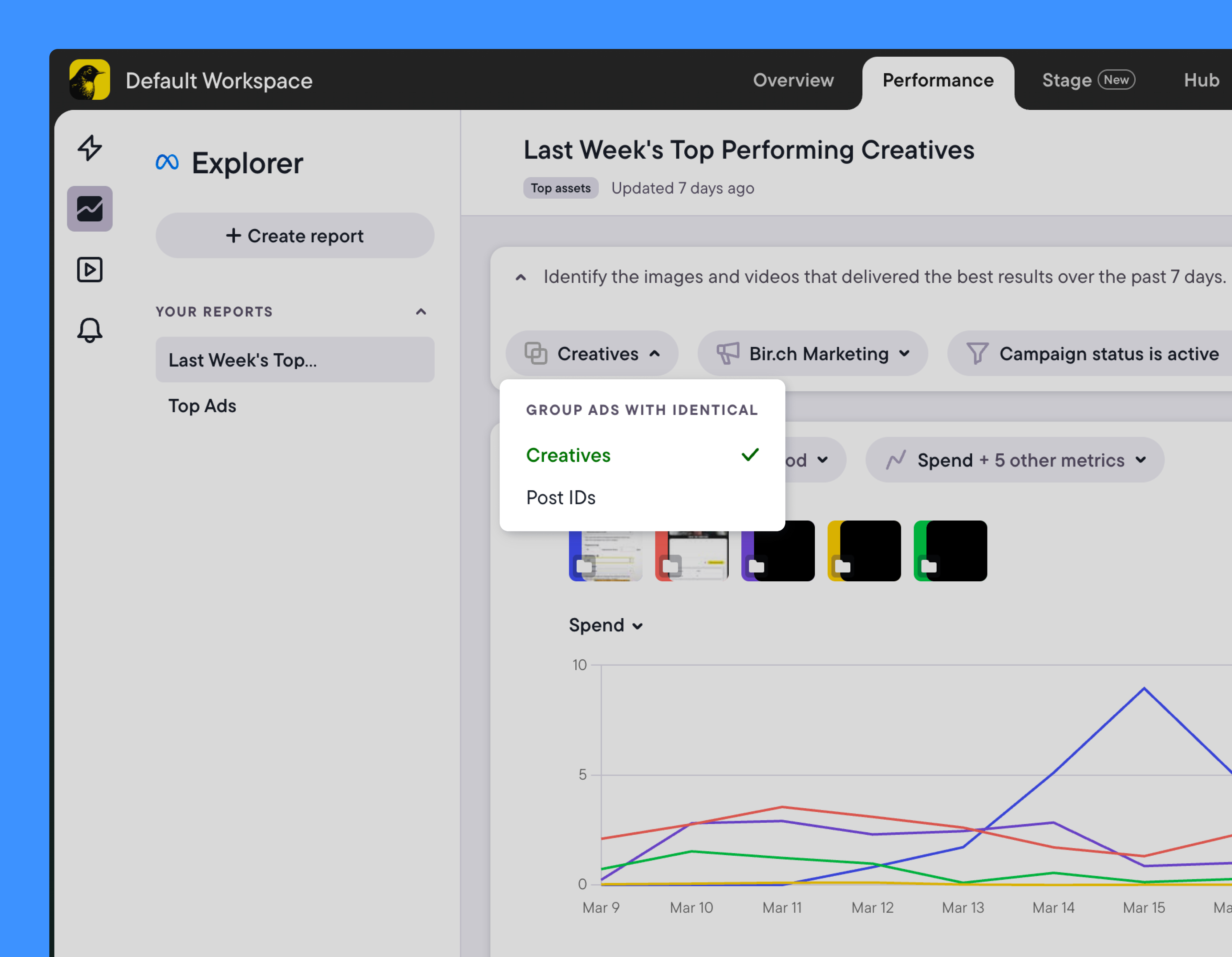
Explorer surfaces performance patterns across campaigns so that what you learn from one test is visible when you’re planning the next one.
Together, they move creative testing closer to a continuous process, rather than a series of one-off experiments whose results don’t accumulate.
Read more: Why Bïrch beats Meta Ads Manager for creative analysis
Scaling what works without rebuilding from scratch
When a campaign performs well, the natural move is to take it to a new market or try it with a fresh round of media.
In practice, that often turns into a full rebuild, because the original structure wasn’t set up with reuse in mind. Targeting, placements, optimization settings, budget logic—each of these has to be reconfigured, and each reconfiguration introduces the risk of something being set slightly differently from the version that was working.
Again, not a dramatic problem, but a consistent one that shows up every time a team tries to move fast on something that’s performing well.
Skip the rebuilding, keep the structure
A more efficient path is to duplicate a winning ad set with new media and skip the rebuilding. The duplicate enters the learning phase independently while the original keeps running untouched. That means you can test a new creative angle, scale spend, or restart delivery on a stalled set without putting existing performance at risk.

Stage shortens this step further. Once new media is ready in Drive, it goes into the duplicated ad set directly from there. The time between “media is approved” and “test is running” gets meaningfully shorter.
Pro tip: If you’re using Launcher for creative testing, Launcher templates save your full ad setup. No need to start from scratch next time.
From file management to workflow design
Performance marketing workflows don’t become complicated all at once. They get heavier one manual step at a time: a single folder turns into four folders, an upload process repeats more than it should, a campaign structure gets rebuilt instead of reused.
Bïrch helps tighten these workflows so that menial tasks become as automated as possible, and Stage was built with that same philosophy in mind. The hours you spend uploading files one by one to your ad accounts add up, and a direct connection from Drive removes that step entirely.
If you want to give workflow optimization a shot, get started with Stage.
FAQs
If you’re managing campaigns across multiple platforms, accounts, or markets, your daily workflow has probably gotten heavier over time. Small manual steps accumulate, and at some point, they take up more of your week than they should.
Some of it’s visible: rebuilding a campaign structure that already existed last month, or sorting through three different folders to find the version of a file the client approved.
But some of it, less so: the coordination overhead that comes with managing multiple accounts in one undivided space, or a creative testing process that looks structured but produces results you can’t reliably compare.
Alone, none of these hurdles would cause a campaign to fail. But they appear in every cycle, so at scale, they slowly compound to become one big hurdle that slows workflows down.
We’ve put together this article to map five workflow steps that could benefit from a bit of simplification.
Key takeaways
- Small, repeated manual steps (file searching, uploads, rebuilds) compound into significant workflow inefficiencies over time.
- A single, well-maintained source of truth for creative assets reduces errors, speeds up collaboration, and eliminates version confusion.
- Moving media from Drive to ad platforms is one of the most time-consuming and lowest-value parts of the workflow.
- Creative testing only scales when setups are standardized—otherwise, results become difficult to compare and act on.
- Tools like Bïrch help streamline workflows by connecting asset management, campaign execution, and testing into one structured system.
The creative asset management process
Most teams have a Drive. Most teams also have a Slack, an email thread or two, and a Notion page where someone dropped the “final” version of something three weeks ago. By the time a campaign is ready, a chunk of time has been spent on finding the right file. Not producing or uploading it. Just locating it.
Pushing an outdated version of a file because the folder wasn’t updated after the last round of feedback is a common side effect of this. For teams running 20–50 new pieces of media per week, this type of confusion can start racking up costs if it recurs every campaign cycle.
What a shared source of truth looks like
A single shared Drive folder with agreed naming conventions, maintained consistently, removes most of these issues.

If followed properly, briefing, handoff, upload, and review all happen from the same reference point. There are fewer questions about which file is current, and new team members can orient themselves without having to track people down. The folder becomes the reference point at every stage of the cycle, not just a place where files happen to land.
“FINAL.reviewed_version2” cannot be living in Jessica’s downloads folder waiting to be summoned via Slack when the campaign is about to go live.
Getting media from Drive into your ad accounts
By the time media is approved and the designer drops the files, everyone on the team already has access to that shared Drive link—because it’s already the single source of truth.
And that’s where the straightforward part ends.
What follows is downloading the files, opening your ad management platform of choice, and uploading them again one by one, repeating the same process for every additional platform and account.
“Our Drive is perfectly organized, but getting it into ad managers is the messy part.” Sound familiar?
The problem itself is small. What makes that small problem an expensive problem is how many times you have to follow the same steps over and over.
For an agency managing 10 client accounts, the same piece of media going to each Meta account means that loop runs 10 times. Add TikTok and Snapchat to the mix, and it runs 30 times before that file is where it needs to be.
For an in-house team testing multiple assets, the upload process becomes the part of the workflow that consistently absorbs the most time, even though it produces nothing beyond the transfer itself.
Removing the gap between Drive and the ad account
Stage, a new feature inside Bïrch, connects your Drive folders directly to your ad accounts in Meta, TikTok, and Snapchat, without asking you to move anything.

Files stay exactly where they are. You connect the folders you need via a shared link, not your entire Google Drive. From there, you bulk upload to different platforms and ad accounts from one screen, with no downloads or re-uploads.
Most bulk upload tools require you to download from Drive and re-upload to their platform first, but Stage reads directly from the link. The folder doesn’t move, the files don’t duplicate, and there’s no new storage layer to maintain alongside the one you already have.
After using Stage with his team, Oleg Popov, Head of Performance Creatives at Scentbird, shared that they cut their media management time by 40%: “A media manager working 40 hours a week can now cover the same ground in around 22.”
Managing multiple accounts without the mess
For agencies and multi-brand operators, the multi-account challenge is a matter of visibility and control.

When campaigns, rules, reports, and assets all live in one undivided account, it’s hard to navigate without touching something that belongs to a different client or product. Knowing which setup belongs to which client, scoping team access to the right data, and giving clients visibility without giving them edit access are coordination problems that someone has to solve manually, usually more than once.
Beyond the internal navigation, there’s the media delivery side. Without a clear structure connecting each client’s Drive folder to their corresponding ad account, someone has to manually bridge that gap every time new assets arrive. Who has the right version? Which account received the updated file? These questions don’t go away on their own.
Keeping it organized across accounts
Workspaces in Bïrch let you organize ad accounts, rules, and reports into a dedicated space per client, brand, or region. Team members see only what’s relevant to them, and clients can be added as view-only, with access limited to email reports.

Consistency across teams becomes easier to maintain when everyone is working from a space scoped to their context.
Combine it with Stage, and you have each client’s Drive folder connected to the respective account in its own workspace. The path from approved media to ad accounts is now direct.
Pro tip: You can connect folders from multiple Drives via a shared link, with no Google account access required. This is useful when clients or internal teams each share folders separately and you need access without requesting credentials from anyone.
Structuring creative testing so it scales
Manual creative testing is reasonable at low volume. A small number of ads, close monitoring, quick decisions—that’s workable when the operation is contained. As media output grows across more campaigns and accounts, the infrastructure behind the testing process tends not to keep pace, and the gaps start to show.
Media ends up running under different conditions across different budgets, audiences, and timeframes, and then it gets compared as if those conditions were equal.
Budget keeps flowing to underperformers longer than it should because performance signals aren’t being read consistently. Learnings from one campaign don’t carry into the next because there’s no shared structure for capturing them.
Over time, the testing process gives you results that are hard to act on. Why? The data isn’t necessarily wrong, but the setup isn’t consistent enough to make the data comparable.
Building a setup that holds at scale
Launcher standardizes how tests are structured and executed. Rather than setting up each ad set individually, you configure the parameters once and generate multiple ad sets from combinations of media in a few clicks.

Media is uploaded directly from Google Drive or your computer, assigned clearly across ad sets, and the whole structure is reviewable before anything goes out. Once the setup is complete, saving it as a Launcher template means the CTA and ad copy fields are pre-filled the next time you use it.
Explorer surfaces performance patterns across campaigns so that what you learn from one test is visible when you’re planning the next one.
Together, they move creative testing closer to a continuous process, rather than a series of one-off experiments whose results don’t accumulate.

Read more: Why Bïrch beats Meta Ads Manager for creative analysis
Scaling what works without rebuilding from scratch
When a campaign performs well, the natural move is to take it to a new market or try it with a fresh round of media.
In practice, that often turns into a full rebuild, because the original structure wasn’t set up with reuse in mind. Targeting, placements, optimization settings, budget logic—each of these has to be reconfigured, and each reconfiguration introduces the risk of something being set slightly differently from the version that was working.
Again, not a dramatic problem, but a consistent one that shows up every time a team tries to move fast on something that’s performing well.
Skip the rebuilding, keep the structure
A more efficient path is to duplicate a winning ad set with new media and skip the rebuilding. The duplicate enters the learning phase independently while the original keeps running untouched. That means you can test a new creative angle, scale spend, or restart delivery on a stalled set without putting existing performance at risk.

Stage shortens this step further. Once new media is ready in Drive, it goes into the duplicated ad set directly from there. The time between “media is approved” and “test is running” gets meaningfully shorter.
Pro tip: If you’re using Launcher for creative testing, Launcher templates save your full ad setup. No need to start from scratch next time.
From file management to workflow design
Performance marketing workflows don’t become complicated all at once. They get heavier one manual step at a time: a single folder turns into four folders, an upload process repeats more than it should, a campaign structure gets rebuilt instead of reused.
Bïrch helps tighten these workflows so that menial tasks become as automated as possible, and Stage was built with that same philosophy in mind. The hours you spend uploading files one by one to your ad accounts add up, and a direct connection from Drive removes that step entirely.
If you want to give workflow optimization a shot, get started with Stage.
FAQs
Operational friction: file management, repeated uploads, unclear ownership across accounts, and inconsistent testing setups. The time spent on these small steps compounds over time, slowing execution speed.
Stage is a feature inside Bïrch that connects Google Drive folders directly to ad accounts in Meta, TikTok, and Snapchat via a shared link. Most bulk upload tools require you to download your files from Drive and re-upload to their platform. Stage reads directly from the link, so files stay where they are already, and there’s no separate storage layer to maintain.
No. Stage connects to folders via a shared link. You connect the folders you need, not your Google Drive account.
Yes. You can push the same media to Meta, TikTok, and Snapchat from one screen, without re-uploading to each platform.
Yes, via shared link. Useful when clients or internal teams each share folders from separate accounts.