Blog

← All posts
Ad Performance
March 18, 2026

Why Bïrch beats Meta Ads Manager for creative analysis

by
Aurora Sandino

You open Ads Manager to review how your creatives are performing, but the results you’re looking for are spread across multiple campaigns. So you jump between campaign reports, apply filters, and export data just to compare how the same creative performed across tests.

This is a structural issue many teams face. Because Meta Ads Manager reports performance at the campaign level, creative results are siloed. When it’s time to analyze, you’re manually piecing together data across multiple campaigns—ultimately slowing down creative testing.

In this article, we’ll look at how Ads Manager handles creative analysis and where its campaign-based reporting starts to limit you as creative testing scales. Then we’ll show how Bïrch extends that foundation with creative-level aggregation and automation built around your own performance data.

Key takeaways

  • Meta Ads Manager reports creative performance inside the campaign structure, which makes cross-campaign creative testing harder to evaluate.
  • As testing volume grows, comparing creatives often turns into manual reports, filters, or exported data.
  • Workflows like evaluating launches, scaling winners, and spotting fatigue end up happening campaign by campaign.
  • Bïrch aggregates creative performance across campaigns and applies consistent performance logic so those decisions happen automatically.

What Meta Ads Manager can do for creative analysis

Meta Ads Manager shows how individual ads perform within a campaign. You can review metrics such as:

  • CTR
  • CPA
  • ROAS
  • CPR
  • Reach
  • Frequency

This helps you see which creative variations drive results and which don’t under the same audience and budget.

Using the Ad Creative breakdown in Ads Reporting, you can compare asset performance within eligible campaigns. Custom reports can also compare creative performance across campaigns—but you need to structure the report manually.

Filters, custom columns, and date ranges help refine these views, and structured creative tests can be run through Experiments. Reports can also be exported for additional analysis outside the platform.

Where Meta Ads Manager falls short for creative performance analysis

As creative testing scales, analyzing performance inside Ads Manager becomes harder to manage. Teams often end up piecing together insights across campaigns, reports, and exports just to understand what’s actually working.

Meta Ads Manager

For performance teams, this creates several limitations:

  • Fragmented reporting: Creative performance is split across campaigns and ad sets. To see how the same creative actually performed across tests, teams resort to exporting reports, stitching data together, and comparing results manually.
  • Reporting limitations: Performance teams often rely on custom KPIs and internal reporting frameworks built over years of testing. Ads Manager reporting is tied to its own metrics and structure, which makes it harder to analyze creative performance using the parameters your team actually works with.
  • Automation limitations: Ads Manager offers basic automated rules, but they’re mostly tied to simple campaign actions. When it comes to creative analysis, automation is limited. Teams can’t easily set up continuous monitoring or get alerts when creative performance crosses important thresholds, so spotting those changes often comes down to manually checking reports.

How Bïrch improves creative analysis workflows

Bïrch structures how performance is launched, evaluated, and acted on across campaigns.

Instead of reviewing ads one campaign at a time, teams can aggregate creative results, group assets based on how tests are structured, and apply consistent performance logic across accounts.

Bïrch rules

Bïrch supports this workflow through the following core features:

  • Launcher standardizes how creative variations are deployed, so your tests run under comparable conditions.
  • Explorer aggregates creative performance across campaigns and highlights patterns such as top-performing ads, downtrends, and fatigue signals. This lets you identify which assets deserve further spend.
  • Rules apply automation using nested conditions, metric comparisons, and ranking logic, so performance thresholds trigger actions. While Meta offers basic automated rules, Bïrch allows more advanced logic.

Ads Manager vs Bïrch: creative analysis workflows compared

Here’s how those differences show up in everyday creative workflows.

Analyzing a new creative launch

In Ads Manager

You review performance inside the campaign where the ads are running, comparing CTR, CPA, and ROAS across ads and applying breakdowns when needed. If the same creative appears in multiple campaigns, you’ll need to build custom reports or export data. This approach is what enables you to aggregate results and evaluate creative performance across those campaigns.

In Bïrch

Tests can be structured at launch using Launcher. Instead of manually creating ads one by one, you upload creatives in bulk and generate ad sets from those assets in a few clicks. For example, you can choose to automatically create one ad set per creative, apply the same audience and budget settings across them, and launch the full test from a single workflow.

Because creatives are deployed in a structured way from the start, performance results stay organized across ad sets and campaigns. It’s then much easier to evaluate the launch once data starts coming in.

Bïrch Launcher

Launch tests with structure from the start.

Scaling a winning creative

In Ads Manager

You identify the top-performing ad and duplicate it into new campaigns or ad sets. Performance is then tracked separately in each location. Manually aggregating the data is the only way you can understand how the creative performs across all the campaigns where it runs.

In Bïrch

Scaling can be automated once a creative reaches a defined performance threshold. For example, a rule might trigger when an ad set reaches ROAS above 2.5 after $1,000 in spend.

In the rule setup, you select the Duplicate action and choose whether the original campaign stays active or pauses. Then, you can decide whether the duplicate should keep the original budget or start with a new one.
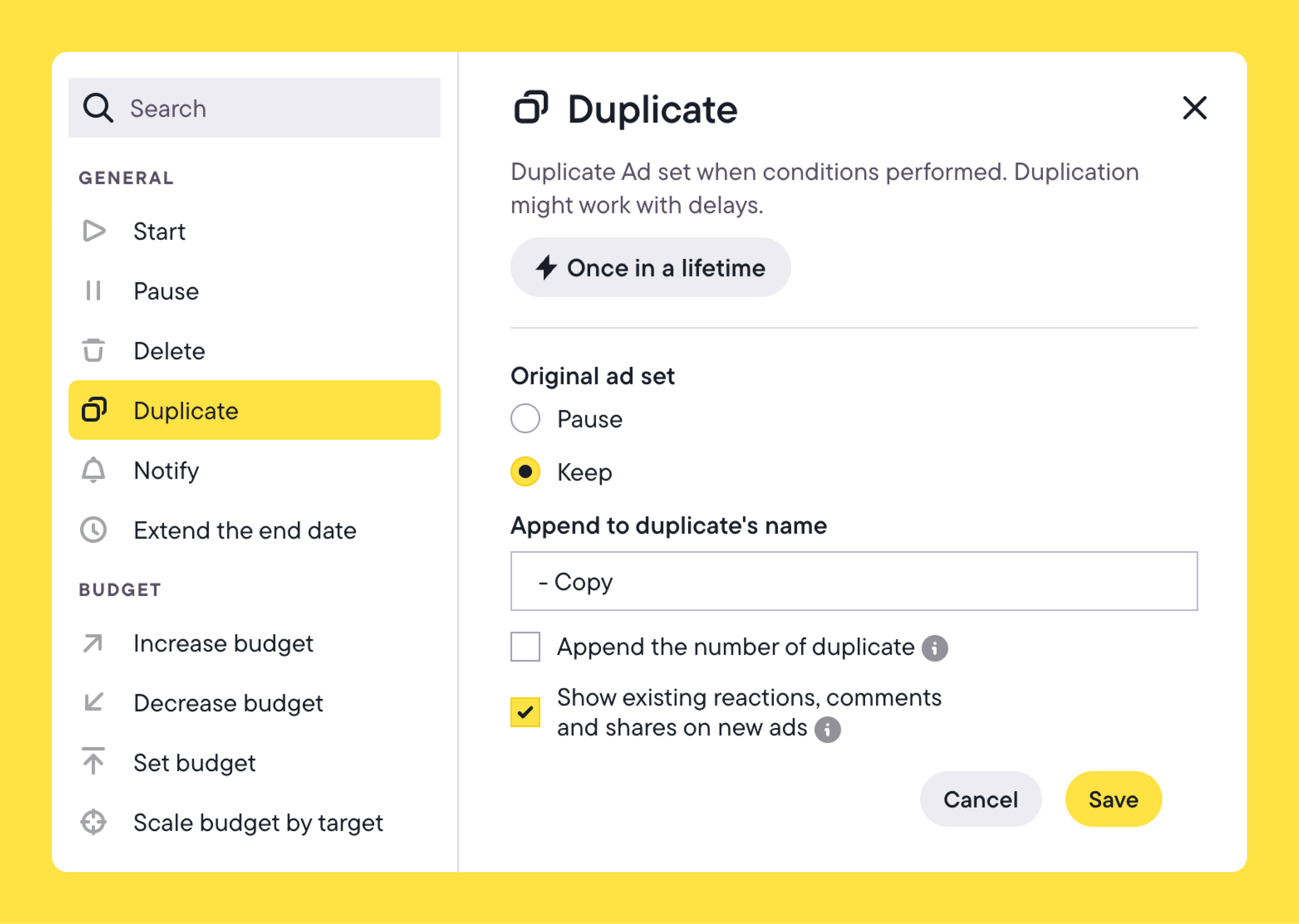
Once the condition is met, Bïrch duplicates the campaign or ad set automatically and applies the new budget settings. Instead of manually duplicating and adjusting budgets each time a creative performs well, scaling happens as soon as the defined performance signal appears.

Spotting creative fatigue

In Ads Manager

You watch for rising CPA, declining CTR, or increasing frequency within each campaign. Fatigue signals are evaluated in context, which means you’re checking performance campaign by campaign.

In Bïrch

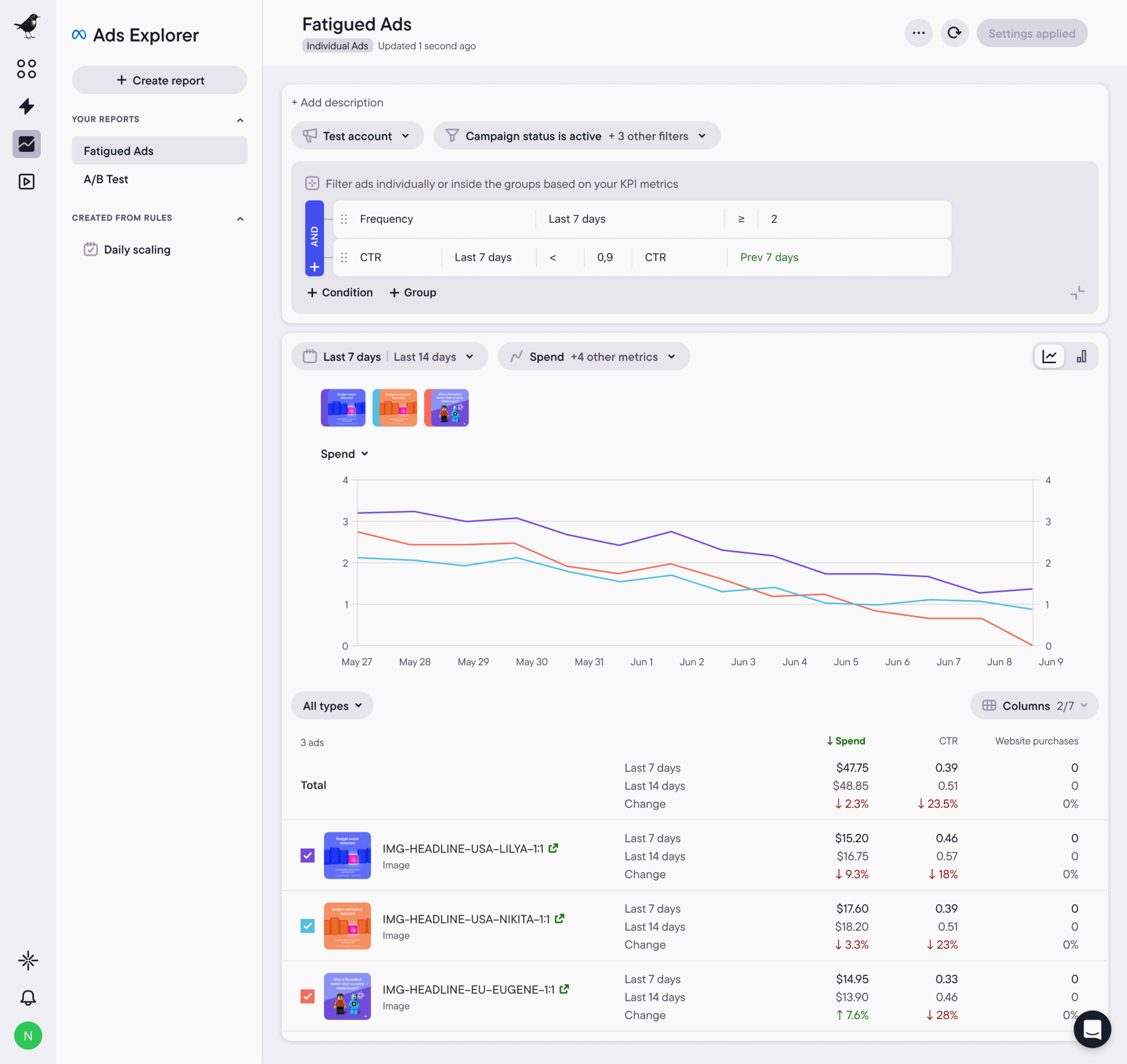
Explorer detects creative fatigue. When creating a report, you can select the Fatigued Ads template, which highlights creatives showing signs of declining performance. Instead of reviewing campaigns individually, Explorer surfaces those creatives across your ads. Teams can quickly identify which assets are starting to become less effective.

Use Explorer to spot creative fatigue earlier and take action before performance drops further.

When Ads Manager still makes sense

Ads Manager works well when creative analysis stays within a single campaign, as it’s designed primarily for campaign management.

If you’re reviewing a small number of ads and making decisions directly from campaign metrics, the built-in reporting is usually enough.

Who Bïrch works best for

Bïrch is built for performance teams running structured creative testing at scale.

If you’re launching variations across multiple campaigns, reusing assets, and making decisions based on blended or custom metrics, you need advanced reporting that goes beyond the single ad level. 

Our features can help teams managing multiple campaigns or accounts where creative testing needs to stay consistent and performance logic needs to be applied the same way each time.
Bïrch Explorer

Creative analysis at scale needs structure

With Ads Manager, creative analysis is inefficient when performance data is scattered across campaigns. Instead of seeing what’s working quickly, teams spend time navigating reports and pulling data together to understand which creatives actually deserve more spend.

That lost time becomes more noticeable as creative testing spreads across more campaigns.

Bïrch brings that analysis into one view. Creative performance is aggregated across campaigns and evaluated using consistent performance logic, so teams can quickly identify what to scale and what to retire—without stitching together reports.

See how Bïrch simplifies creative analysis at scale.

Explore Bïrch with a 14-day free trial

FAQs

You open Ads Manager to review how your creatives are performing, but the results you’re looking for are spread across multiple campaigns. So you jump between campaign reports, apply filters, and export data just to compare how the same creative performed across tests.

This is a structural issue many teams face. Because Meta Ads Manager reports performance at the campaign level, creative results are siloed. When it’s time to analyze, you’re manually piecing together data across multiple campaigns—ultimately slowing down creative testing.

In this article, we’ll look at how Ads Manager handles creative analysis and where its campaign-based reporting starts to limit you as creative testing scales. Then we’ll show how Bïrch extends that foundation with creative-level aggregation and automation built around your own performance data.

Key takeaways

  • Meta Ads Manager reports creative performance inside the campaign structure, which makes cross-campaign creative testing harder to evaluate.
  • As testing volume grows, comparing creatives often turns into manual reports, filters, or exported data.
  • Workflows like evaluating launches, scaling winners, and spotting fatigue end up happening campaign by campaign.
  • Bïrch aggregates creative performance across campaigns and applies consistent performance logic so those decisions happen automatically.

What Meta Ads Manager can do for creative analysis

Meta Ads Manager shows how individual ads perform within a campaign. You can review metrics such as:

  • CTR
  • CPA
  • ROAS
  • CPR
  • Reach
  • Frequency

This helps you see which creative variations drive results and which don’t under the same audience and budget.

Using the Ad Creative breakdown in Ads Reporting, you can compare asset performance within eligible campaigns. Custom reports can also compare creative performance across campaigns—but you need to structure the report manually.

Filters, custom columns, and date ranges help refine these views, and structured creative tests can be run through Experiments. Reports can also be exported for additional analysis outside the platform.

Where Meta Ads Manager falls short for creative performance analysis

As creative testing scales, analyzing performance inside Ads Manager becomes harder to manage. Teams often end up piecing together insights across campaigns, reports, and exports just to understand what’s actually working.

Meta Ads Manager

For performance teams, this creates several limitations:

  • Fragmented reporting: Creative performance is split across campaigns and ad sets. To see how the same creative actually performed across tests, teams resort to exporting reports, stitching data together, and comparing results manually.
  • Reporting limitations: Performance teams often rely on custom KPIs and internal reporting frameworks built over years of testing. Ads Manager reporting is tied to its own metrics and structure, which makes it harder to analyze creative performance using the parameters your team actually works with.
  • Automation limitations: Ads Manager offers basic automated rules, but they’re mostly tied to simple campaign actions. When it comes to creative analysis, automation is limited. Teams can’t easily set up continuous monitoring or get alerts when creative performance crosses important thresholds, so spotting those changes often comes down to manually checking reports.

How Bïrch improves creative analysis workflows

Bïrch structures how performance is launched, evaluated, and acted on across campaigns.

Instead of reviewing ads one campaign at a time, teams can aggregate creative results, group assets based on how tests are structured, and apply consistent performance logic across accounts.

Bïrch rules

Bïrch supports this workflow through the following core features:

  • Launcher standardizes how creative variations are deployed, so your tests run under comparable conditions.
  • Explorer aggregates creative performance across campaigns and highlights patterns such as top-performing ads, downtrends, and fatigue signals. This lets you identify which assets deserve further spend.
  • Rules apply automation using nested conditions, metric comparisons, and ranking logic, so performance thresholds trigger actions. While Meta offers basic automated rules, Bïrch allows more advanced logic.

Ads Manager vs Bïrch: creative analysis workflows compared

Here’s how those differences show up in everyday creative workflows.

Analyzing a new creative launch

In Ads Manager

You review performance inside the campaign where the ads are running, comparing CTR, CPA, and ROAS across ads and applying breakdowns when needed. If the same creative appears in multiple campaigns, you’ll need to build custom reports or export data. This approach is what enables you to aggregate results and evaluate creative performance across those campaigns.

In Bïrch

Tests can be structured at launch using Launcher. Instead of manually creating ads one by one, you upload creatives in bulk and generate ad sets from those assets in a few clicks. For example, you can choose to automatically create one ad set per creative, apply the same audience and budget settings across them, and launch the full test from a single workflow.

Because creatives are deployed in a structured way from the start, performance results stay organized across ad sets and campaigns. It’s then much easier to evaluate the launch once data starts coming in.

Bïrch Launcher

Launch tests with structure from the start.

Scaling a winning creative

In Ads Manager

You identify the top-performing ad and duplicate it into new campaigns or ad sets. Performance is then tracked separately in each location. Manually aggregating the data is the only way you can understand how the creative performs across all the campaigns where it runs.

In Bïrch

Scaling can be automated once a creative reaches a defined performance threshold. For example, a rule might trigger when an ad set reaches ROAS above 2.5 after $1,000 in spend.

In the rule setup, you select the Duplicate action and choose whether the original campaign stays active or pauses. Then, you can decide whether the duplicate should keep the original budget or start with a new one.

Once the condition is met, Bïrch duplicates the campaign or ad set automatically and applies the new budget settings. Instead of manually duplicating and adjusting budgets each time a creative performs well, scaling happens as soon as the defined performance signal appears.

Spotting creative fatigue

In Ads Manager

You watch for rising CPA, declining CTR, or increasing frequency within each campaign. Fatigue signals are evaluated in context, which means you’re checking performance campaign by campaign.

In Bïrch

Explorer detects creative fatigue. When creating a report, you can select the Fatigued Ads template, which highlights creatives showing signs of declining performance. Instead of reviewing campaigns individually, Explorer surfaces those creatives across your ads. Teams can quickly identify which assets are starting to become less effective.

Use Explorer to spot creative fatigue earlier and take action before performance drops further.

When Ads Manager still makes sense

Ads Manager works well when creative analysis stays within a single campaign, as it’s designed primarily for campaign management.

If you’re reviewing a small number of ads and making decisions directly from campaign metrics, the built-in reporting is usually enough.

Who Bïrch works best for

Bïrch is built for performance teams running structured creative testing at scale.

If you’re launching variations across multiple campaigns, reusing assets, and making decisions based on blended or custom metrics, you need advanced reporting that goes beyond the single ad level. 

Our features can help teams managing multiple campaigns or accounts where creative testing needs to stay consistent and performance logic needs to be applied the same way each time.

Bïrch Explorer

Creative analysis at scale needs structure

With Ads Manager, creative analysis is inefficient when performance data is scattered across campaigns. Instead of seeing what’s working quickly, teams spend time navigating reports and pulling data together to understand which creatives actually deserve more spend.

That lost time becomes more noticeable as creative testing spreads across more campaigns.

Bïrch brings that analysis into one view. Creative performance is aggregated across campaigns and evaluated using consistent performance logic, so teams can quickly identify what to scale and what to retire—without stitching together reports.

See how Bïrch simplifies creative analysis at scale.

Explore Bïrch with a 14-day free trial

FAQs

What is creative analysis in Meta Ads Manager?

Creative analysis in Ads Manager means reviewing ad-level performance within campaigns using metrics like CTR, CPA, ROAS, reach, and frequency.

Can Ads Manager compare creatives across campaigns?

You can use Ads Manager to compare creatives across campaigns, but that involves manually building custom reports or exporting data. Cross-campaign aggregation isn’t structured by default.

Why does Ads Manager become limiting at scale?

Ads Manager becomes limiting at scale because performance is tied to campaign structure. Comparing creative concepts across campaigns depends on manual grouping, naming conventions, and exports.

How does Bïrch improve creative analysis?

Bïrch aggregates creative performance across campaigns and allows structured grouping. It also applies consistent performance logic instead of relying on manual reports.

What role does Launcher play in creative analysis?

Launcher standardizes how creative variations are deployed. Tests run under comparable conditions from the start.

What does Explorer do for creative performance?

Explorer groups creatives across campaigns, applies performance conditions, and helps detect fatigue or downtrends. There’s no need to export data.

When does Meta Ads Manager still make sense?

Ads Manager could be sufficient for your team if analysis stays within single campaigns and manual optimization is enough.

Aurora Sandino
is a writer and SEO strategist focused on marketing, performance, and the digital landscape. She's a contributing writer for Bïrch, with a background in content strategy and client account management.

Get started with Bïrch product

14
days free trial
Cancel anytime
No credit card required