Worried about your ads getting flagged? Monitor your campaigns and pause problem ads automatically with Birch.
Meta advertising policies outline what you can and can’t advertise across Meta platforms. Not following these rules could put you at risk of having your ad rejected. A single disapproval can throw off your entire campaign.
The challenge is that it’s not always clear what Meta’s rules are. Meta advertising policies are hard to find, and ads can get flagged without warning. If you’re testing creatives or running ads in sensitive industries like health or finance, it gets even more confusing.
No more need for guessing—this guide details Meta’s ad policies clearly, including how key policies affect ad creative, targeting, and account health. You’ll also find out how to avoid rejections and navigate stricter rules around topics like health, finance, and social issues.
Key Meta ad policies
Meta has a long list of ad policies, not all of them apply to every advertiser. It’s helpful to know which policies apply to you and how they impact the way you create ads. Some rules are universal. Others depend on your industry, targeting, or format.
Unacceptable content
Some topics are completely banned from advertising on Meta. If your ad touches on anything illegal, discriminatory, or harmful, it will be rejected. This applies to the language, imagery, and implications in your creative. If your ad even indirectly suggests or promotes something from the list below, it won’t be approved.
- Child sexual exploitation, abuse, and nudity
- Coordinating harm or promoting crime
- Dangerous organizations and individuals
- Discriminatory practices
- Hateful conduct
- Human exploitation
- Locally illegal products or services
- Misinformation
- Vaccine discouragement
Fraud, scams, and deceptive practices
Meta doesn’t allow ads that try to mislead, trick, or exploit users. These policies are in place to protect people from dishonest tactics, data theft, or financial scams.
The following are not allowed:
- Fraud, scams, and deceptive practices
- Unacceptable business practices
- Circumventing review systems
Unrealistic ads that exaggerate claims or try to manipulate the review system can get rejected or flagged—even if they appear harmless.
Restricted goods and services
If you’re running ads in a high-risk or regulated category, Meta will treat your campaign differently.
You might need to adjust your targeting, add disclaimers, or get written permission before your ad can go live. Even if the product is legal, Meta can still reject the ad if it doesn't follow their platform rules.
The following categories often trigger stricter review, so it’s important to be extra careful with your copy, creative, and landing pages:
- Alcohol
- Commercial exploitation of crises and controversial events
- Dating ads
- Hazardous goods and materials
- Health and wellness
- Historical artifacts
- Sale of human body parts and bodily fluids
- Sale of non-endangered animals and endangered species
- Tobacco and related products
- Weapons, ammunition, and explosives
- Drugs and pharmaceuticals
- Drug and alcohol addiction treatment
- Financial and insurance products and services
- Cryptocurrency products and services
- Online gambling and games
Objectionable content
This category covers content that’s graphic, offensive, or inappropriate for a wide audience.
Ads are not allowed to include nudity, sexually suggestive content, harassment, violent imagery, or anything that violates someone’s privacy or targets their personal traits.
Here’s a list of objectionable content that goes against Meta’s ad policies:
- Adult nudity and sexual activity
- Adult sexual exploitation
- Adult sexual solicitation and sexually explicit language
- Bullying and harassment
- Profanity
- Privacy violations and personal attributes
- Violent and graphic content
- Suicide, self-injury, and eating disorders
Intellectual property infringement
Meta doesn’t let you use copyrighted material, trademarks, or branding that you don’t have the rights to. This applies to other companies’ intellectual property and Meta’s brand assets.
Here’s what’s not allowed:
- Promoting fake products
- Third-party intellectual property infringement
- Unauthorized use of Meta’s intellectual property or brand assets
Social issue, electoral, or political advertising
If your ad touches on social issues, politics, or elections, you need to go through Meta’s authorization process. It involves verifying your identity and adding a “paid for by” disclaimer to your ads.
This policy applies to both individuals and organizations.
In some regions, Meta may restrict or block these ads entirely during elections or sensitive events, even if they’re approved elsewhere. So, if your content could be seen as political, like talking about immigration, education, climate change, or healthcare, then it’s best to assume it requires review and authorization before you can run it.
Product and format-specific policies
Different types of ads have specific requirements. These policies ensure that ads meet specific requirements for different formats and maintain relevance and transparency. These include:
- Non-functional landing pages: Ads must not direct people to non-functional landing pages that interfere with navigation.
- Video ads: Video ads and dynamic ad types must follow all the rules, including not using overly disruptive tactics. Certain content in ads for film trailers, TV shows, and video game trailers may require prior permission and should target adults. Meta doesn’t permit excessive depictions of drugs and alcohol use, adult content, profanity, and violence within these ads.
- Lead ads: Advertisers need permission for lead ads questions that request specific types of information.
- Targeting: Advertisers must not use targeting to discriminate, harass, or engage in predatory practices.
- Relevance: Ads must accurately represent the company, product, or service being advertised, and all ad components must be relevant. The content on the landing page should match the ad.
- Branded content: Ads promoting branded content must use the branded content tool to tag the featured third-party product, brand, or business partner. Branded content involves content influenced by a business partner for value exchange.
💡 Keeping track of which ads get flagged, which ad sets are underperforming, and where your budget is going is easier with the right reporting. See how Birch can help
What are Meta ad policies?
Meta advertising policies, officially known as Meta’s Advertising Standards, outline what you’re allowed to do when running ads on Meta. They aim to keep users safe and ensure ads meet certain quality and legal standards.
Meta uses automated systems to review every ad and check for policy violations. Ads that don’t pass these reviews are rejected. In some cases, violations can even lead to account restrictions.
Meta also expects marketers to follow these guidelines:
- Community Standards: These apply to all content, including ads, and cover things like hate speech, violence, misinformation, and privacy violations.
- Terms of Service: These are the broader platform terms, covering account usage, data handling, and prohibited behavior.
- Local laws and regulations: Even if an ad complies with Meta’s policies, it also needs to comply with the laws in the regions it’s targeting.
- Self-regulatory codes: Advertising guidelines set by regulatory bodies apply in some industries and countries.
Meta advertising policy principles explained
Meta’s advertising policy principles are the values behind their ad rules. They explain why certain things get blocked and how Meta decides what’s acceptable on their platforms.
1. Protecting people from unsafe and discriminatory practices: Meta asks you to follow the local laws in your area and avoid discriminatory practices. It also warns against promoting illegal or harmful substances.
2. Protecting people from fraud or scams: Ads that use deceptive or misleading tactics, including those aimed at defrauding people or asking for personal information, are strictly prohibited.
3. Promoting positive user experiences: Meta tries to keep the user experience safe and comfortable by blocking ads that are overly violent, sexual, offensive, or that make people feel negatively about themselves, especially in health or weight loss content.
4. Promoting transparency: Meta wants users to know what ads they are seeing. They keep a library of all the ads and show who paid for them, which holds advertisers responsible. The Ad Library offers insights into all current ads, especially those related to social issues, elections, or politics.
3 tips to stay compliant and protect your ad account
1. Keep a compliance tracker for your creatives
Try setting up a simple spreadsheet or use a reporting tool where you log which ads get approved right away and which get flagged or take longer. Over time, you’ll start to recognize the types of copy, visuals, or offers that tend to cause issues, so you can make changes early and avoid delays.
2. Know your category and build a mini-checklist
Before you hit publish, take a minute to think about the kind of ad you’re running. Is it about health? Credit? Jobs? Each of those has its own set of rules. Once you know where it falls, check the specific policy for that type and jot down a quick checklist. It will save you headaches later and help you catch anything Meta might flag.
3. Keep an eye on your feedback score
Meta looks at your feedback score to see how users are responding after they click. If people report your ads or feel misled by what they find, your score can drop. This can affect delivery and cost.
If you notice your score going down, pause the ad, check your messaging and landing page, and make changes before running it again.
Tools like Birch help you set rules that flag performance shifts potentially linked to changing customer sentiment. Birch AI goes a step further, analysing those rules and your ad account data to surface the contradictions, the blind spots, and the setups worth doubling down on.
Why ad accounts get banned
Accounts don’t get banned for one mistake. Meta looks for repeated issues that signal a pattern of non-compliance.
Here are some of the things that could attract Meta’s attention and risk an account ban:
- Ads keep getting rejected, even for small things
- Making constant edits or changing budgets too quickly, especially right after launching
- Trying to get around the system by using misleading tactics, hiding landing pages, or creating multiple accounts for the same offer
- Promoting restricted services like financial products or supplements without proper approval or disclaimers
Meta watches more than just your ad. It checks your landing page, your Page quality, and how people respond to your ads. If it sees a pattern of low-quality experiences, high rejection rates, or policy violations, it can slow or even stop your ad delivery. A ban means losing your ad access, data, and campaign momentum, which can be costly and hard to recover from.
Ad categories and approval rules
Not all ads are reviewed the same way. Depending on what you’re promoting, Meta might apply different standards, restrictions, or review processes. If your ad falls into a regulated category, like finance, healthcare, or alcohol, it will likely go through more scrutiny and may require extra steps like written approval, targeting limitations, or disclaimers.
For ads that involve credit, employment, housing, or social issues, Meta uses something called “Special Ad Categories.” These come with built-in restrictions—like limited targeting options—to help protect users from discrimination. You’ll need to disclose these when setting up your campaign. If you skip that step or label your ad incorrectly, your campaign may get rejected or delayed.
Even with automation simplifying campaign management, it’s still important to make sure everything’s set up in compliance with Meta’s guidelines—otherwise, the ad won’t run.
What to do if your ad or account gets flagged
If your ad gets rejected and you’re not sure why, Meta gives you a chance to request a review and explain your case.
Here’s how to do that:
- Go to Business Support Home.
- Go to the account or catalog where the rejected ad is located.
- Pick the exact ad, ad set, or campaign you want reviewed.
- Select the Request review option, then follow the prompts to submit your request.
If your ad account got restricted or blocked for reasons unclear to you, follow this procedure:
- Go to Business Support Home and on the left menu, select Account status overview.
- Select your restricted account.
- Select Request review in the What you can do section.
- Complete the steps.
The ad review process
Before your ad can go live, Meta runs it through an automated review system to check that it follows their advertising rules. Most ads are reviewed within 24 hours, but it can take longer.
Bear in mind that Meta can re-review an approved ad at any time, even after it’s already running.
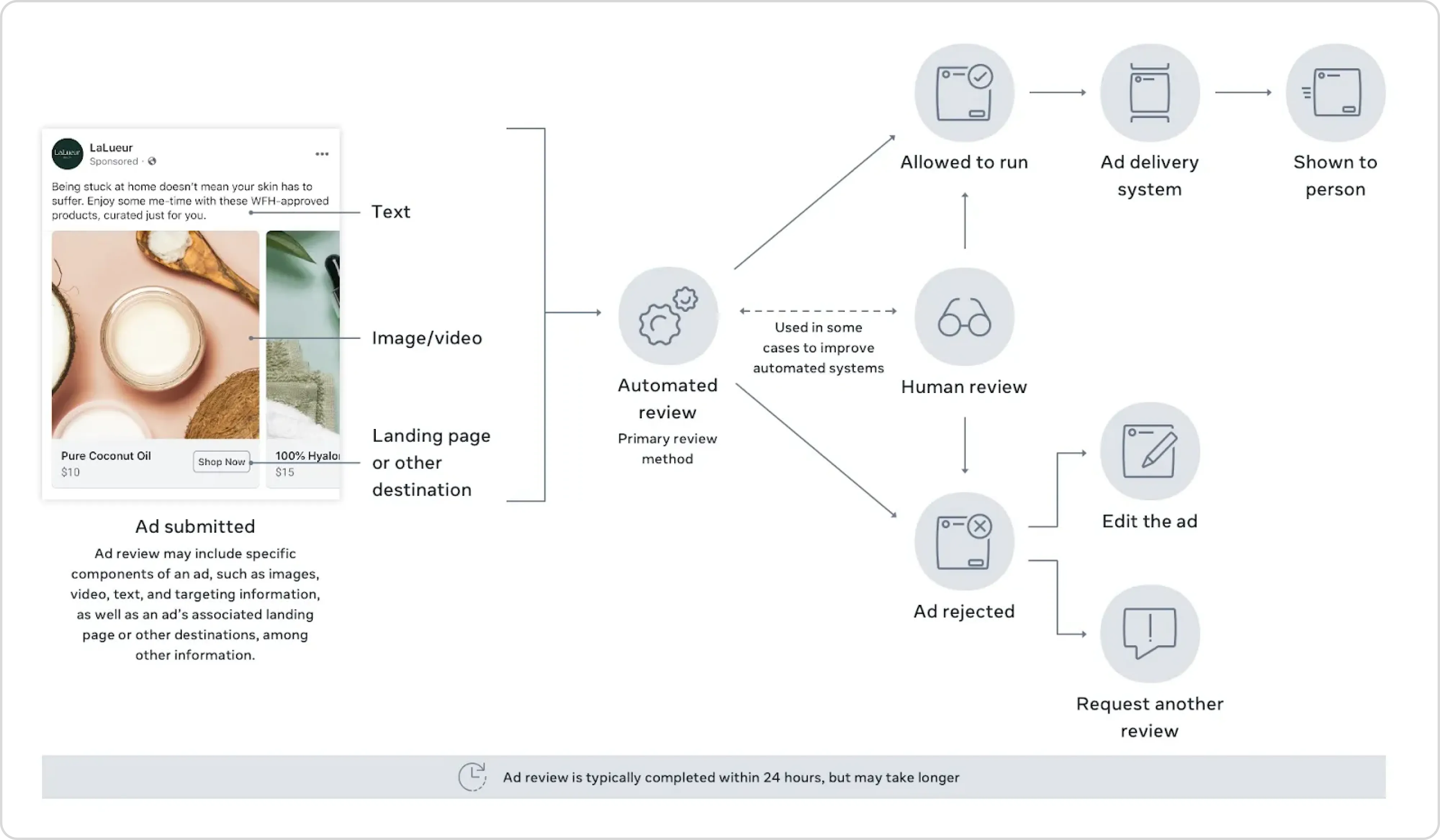
The system looks at the following:
- Your ad’s images, video, or copy
- Targeting info (who you’re trying to reach)
- The landing page your ad links to
- Special Ad Category labels (like housing, credit, or jobs)
- Permissions and past account behavior
If you edit your ad later, it will go back into review again. Adjusting your budget or schedule won’t trigger a new review.
Meta’s system and human reviewers can make mistakes. If your ad gets rejected and you believe it shouldn’t have been, you can request a second review through Meta Business Support.
Adapt your strategy and stay compliant
Meta's policies aren't going to get simpler. As the platform evolves and regulations tighten—especially around AI-generated content, political advertising, and financial products—staying compliant means staying informed and acting on problems quickly before they affect delivery or escalate to a restriction.
The practical challenge isn't knowing the rules, but keeping up with them across dozens of active campaigns. A rejected ad is a signal to slow down and check your approach, but by then the damage is already done. The better approach is catching issues before Meta does.
Birch helps you do that automatically. Set rules to pause underperforming or flagged ads, monitor account health in real time, and keep your budget focused on campaigns that are actually running.